

Check the audit log
See every admin and automatic action on Fit+, who did it, why, what changed and who was told.
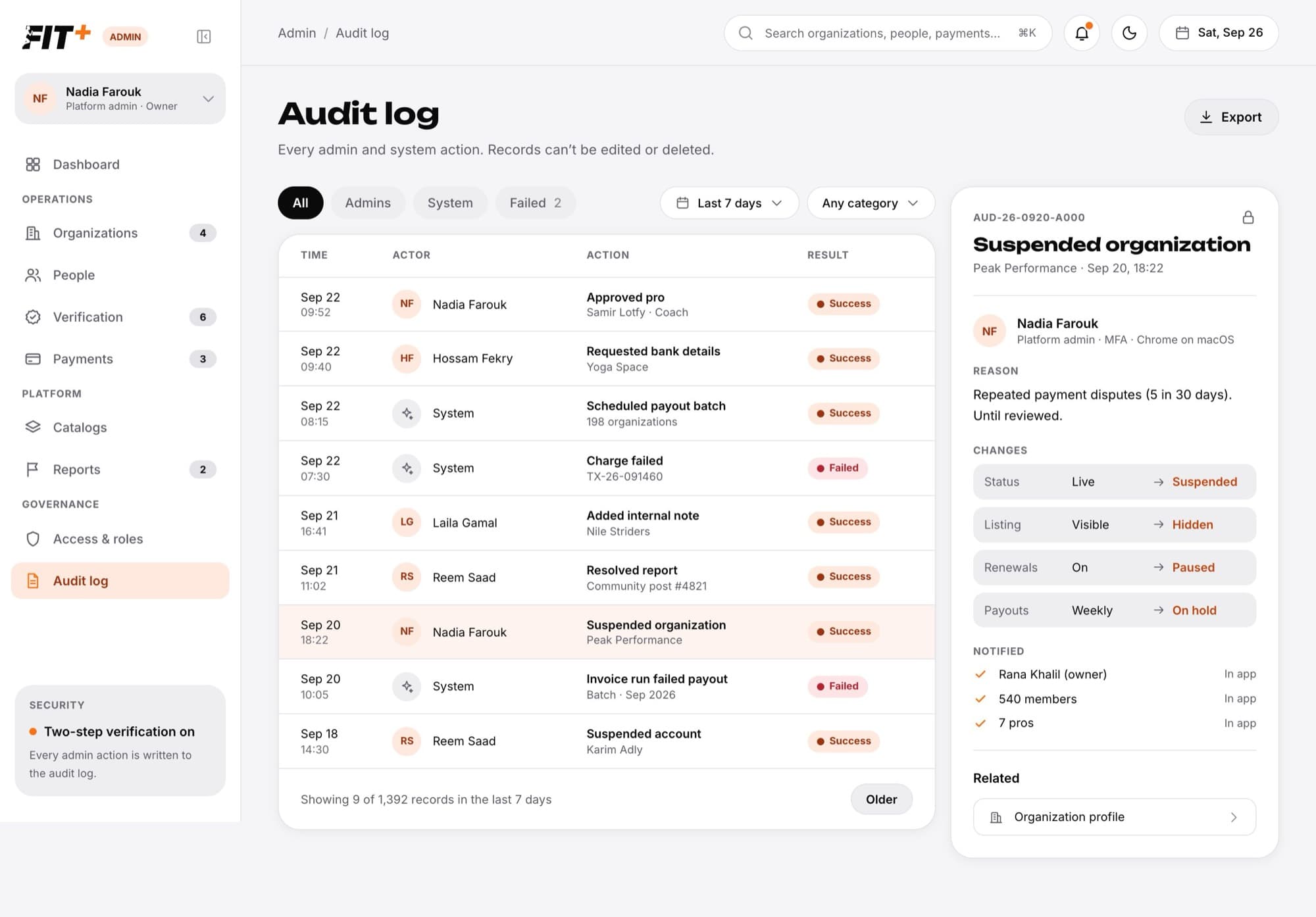
The Audit log records every admin and automatic action on Fit+. Use it to answer who did what, when and why. Records can't be edited or deleted, by anyone.
What gets recorded
- Admin actions: organization decisions, document checks and notes, account suspensions and sign-in resets, pro decisions, professional accounts created with Add professional, payment follow-ups, fee changes, report decisions, invitations, role changes, grants and every admin sign-in.
- Account deletions: whether the member deleted their own account or an admin finished an Account closure request. The record keeps no name or email, only how many records were removed, kept or handed over.
- Automatic actions: failed charges, payout runs and timed suspensions ending.
Find a record
Open Audit log
Choose Audit log in the sidebar.
Choose who did it
All, Admins, System (automatic actions) or Failed (actions that didn't go through).
Pick a period
Choose Last 24 hours, Last 7 days, Last 30 days or Last 90 days.
Pick a category
Choose Organizations, People, Payments, Reports or Access.
Open a record
Choose a row. Choose Older at the bottom to see more.
To see everything about one person, open their page in People, choose the Activity tab, then Open in the audit log. The audit log opens filtered to them.
Read a record
Each record has a reference (starting with AUD), the time, and:
- Who: the admin, their role and browser, or an automatic process.
- Reason: what the admin typed.
- Changes: each thing that changed, before and after.
- Notified: who was told and how (in the app or by email).
- Related: links to the organization, person, payment, report or application.
Download records
Choose Export to download the records that match your filters as a spreadsheet.
Common questions
Everyone on the Fit+ team.
No. Records can't be changed. If you made a mistake, fix it (for example, restore an account) and the fix is recorded too.