

See where you rank
Check the leaderboard for your gym, your friends or all of Fit+, choose whether you appear on it and how your name is shown.
Ranks is a friendly leaderboard. Members who choose to take part earn points for every workout they finish, and the top three stand on a podium.
Check the leaderboard
Tap Community, then Ranks. You can also tap Me, then Achievements, then Ranks.
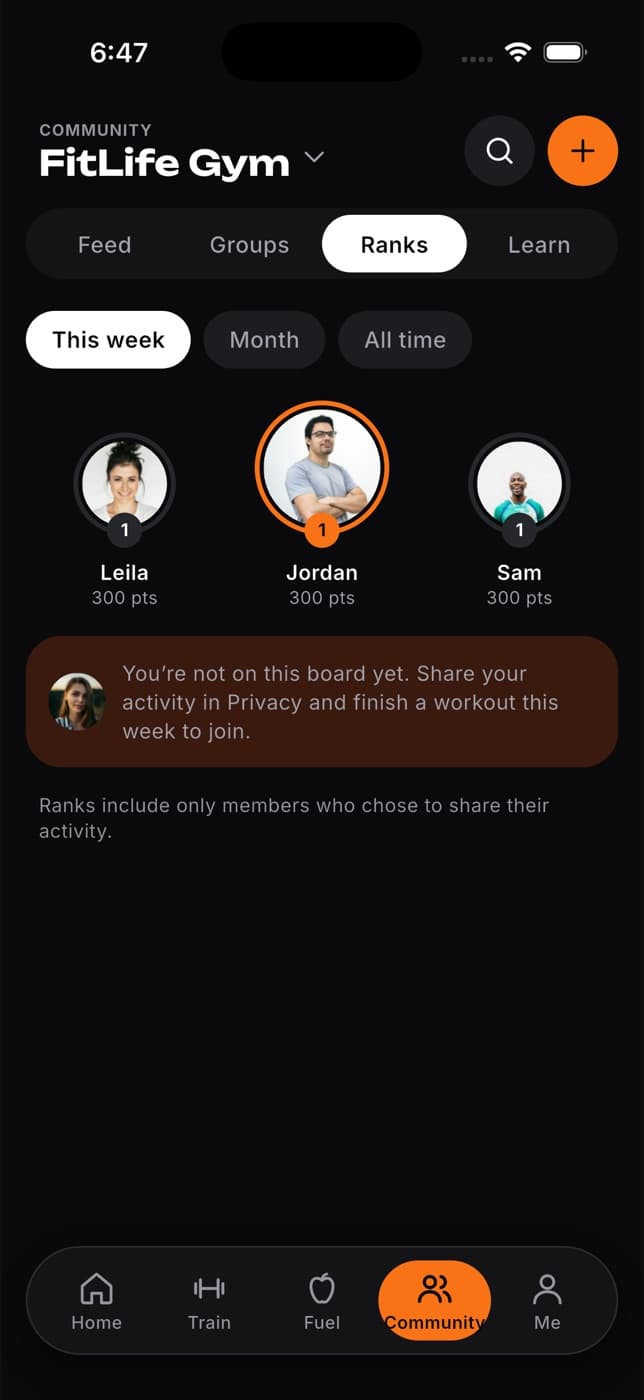
Choose a board at the top:
- Your space: the gym, club or team shown at the top of Community, or Everyone if you haven't joined one. To switch, tap the name at the top of Community and choose a space, or All of Fit+ for everyone.
- Friends: people you follow who follow you back.
Choose a period: This week, Month or All time.
How points work
- You earn 100 points for each workout you complete in the period.
- Only finished workouts count. Longer or harder sessions don't earn extra points.
- People with the same points share a place, for example 1, 2, 2, 4.
- Your own card shows your place and how many workouts you need to move up.
Appear on the leaderboard
Being on a leaderboard is off until you turn it on, so nobody sees your activity unless you choose to share it.
On Ranks, tap the lock button next to the board switch (Leaderboard privacy). You can also tap your own card (or the "You're not on this board yet" card), or Show me on leaderboards when a board is empty.
Turn on Show me on leaderboards.
Under Where, choose how widely you appear: Friends, your gym, or Everyone. Each choice includes the smaller ones, so your gym includes your friends, and Everyone includes both.
Under Name shown, choose your first name and the first letter of your last name, with your photo, or Initials only, with no photo.
Tap Save. Finish a workout and you'll appear on the board for that period.
You can also change these choices on the website. See Achievements on the website.
Only your name, photo, number of workouts and points are shown. Points come from workouts only: no health, food or body data is ever shown.
Common questions
Open Leaderboard privacy and check that Show me on leaderboards is on and covers this board. Then complete at least one workout in the period you're looking at.
The friends board shows people you follow who follow you back. If you have no friends yet, tap Find people to search Community. If you do, Fit+ tells you how many of them show on the board: each friend chooses this in their own leaderboard settings.
You need an active membership at that gym to see its board.
Weeks start on Monday and months on the 1st.