

View financial records
For finance viewers with temporary read-only access to payments, revenue share and membership passes.
If a Platform admin has given you finance access, you can read Fit+ financial records for a limited time: payments, how revenue is shared with gyms, and membership passes. You can look, but you can't change anything. This page shows you how to open your records and what you'll see.
Before you start
- You need an active finance access grant. A Platform admin gives it to you. See Give temporary access.
- Your access has an end date. After that, the records disappear from your account.
Open your financial records
Sign in to the Fit+ website
Use your usual Fit+ email and password.
Open Financial records
You land on Financial records. If you also use other Fit+ workspaces, choose Finance viewer from the account menu at the top of the sidebar.
Check your access
The Your access panel shows each grant you have, what it covers, the reason, how many days are left and the end date.
Read the records
Pick a view
Choose Transactions, Revenue share or Memberships.
Pick a currency
For Transactions and Revenue share, choose a Currency. Totals are never mixed across currencies.
Read the totals
The tiles show Gross (what was paid), Platform fee and Net to gyms.
| View | What you see |
|---|---|
| Transactions | Each payment with the date paid, member, gym, amount, fee and status. Filter by Paid, Pending, Failed or Refunded, or search by description or reference. Choose a payment to see its organization, reference, payment method and time. |
| Revenue share | Paid transactions grouped by organization, with the number of transactions, gross, platform fee and net to the gym. |
| Memberships | Membership passes with the member, gym, offer, start date, expiry date and status. |
On your phone
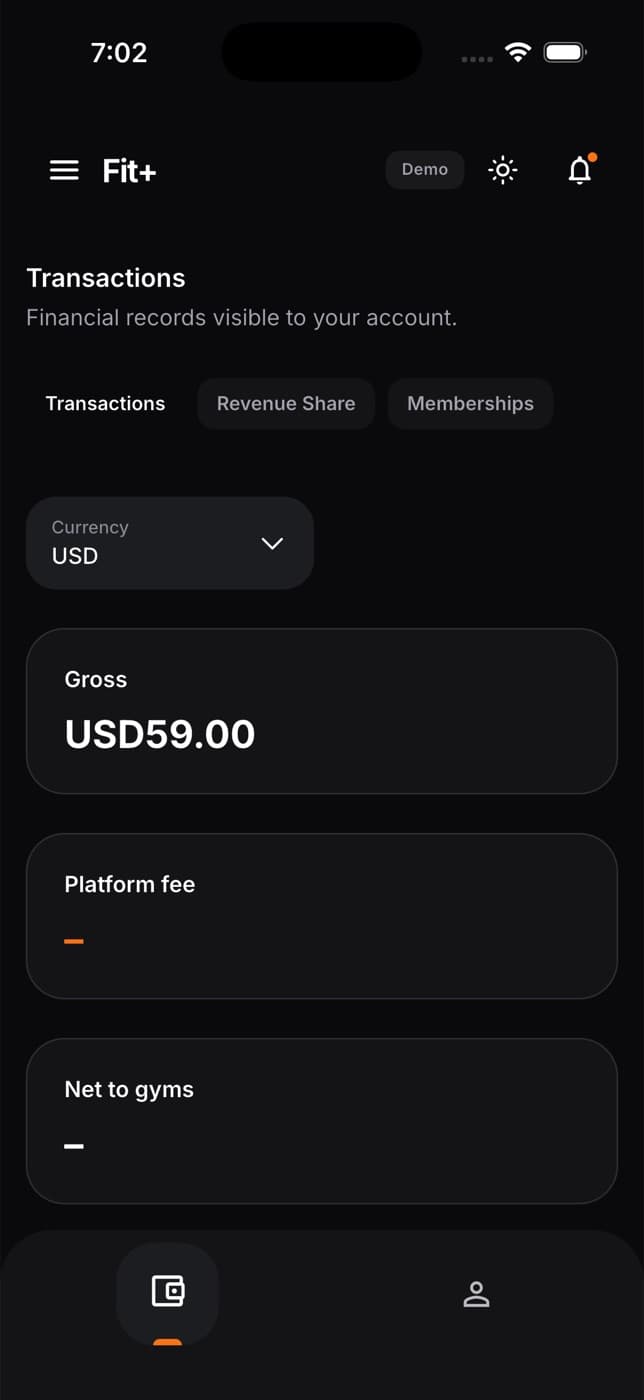
You can read the same records in the Fit+ app. Tap the workspace label at the top of the screen and choose Finance viewer.
What you can't do
- Change, refund or add payments.
- Download the records.
- See health data, member lists or messages.
- Open the admin website.
Common questions
Your access covers financial records, not who the members are. When a name isn't shown, the details say it isn't visible to your account.
Some payments don't carry the fee with them, so the fee and net tiles can't be worked out from those payments. The Fit+ team sees the fee in their own payouts screen.
The records stop showing straight away and the Finance viewer workspace disappears from your account. Ask a Platform admin if you need more time.