

Change today or this week
Start or log today's sport session, go to the gym instead, move or skip a match, move any session in the week, and decide what comes when your season ends.
On a sport plan, your sport days sit in your week next to your gym days. Plans change: a match moves, it rains, or you'd rather lift. This page shows how to change today, or the whole week, in a few taps. See Sport plans to find and start one.
A sport day is never a missed day. If you don't play, it reads Not played today and your week's count stays the same. Fit+ only suggests days and moves: it never moves a session for you.
Today's sport card
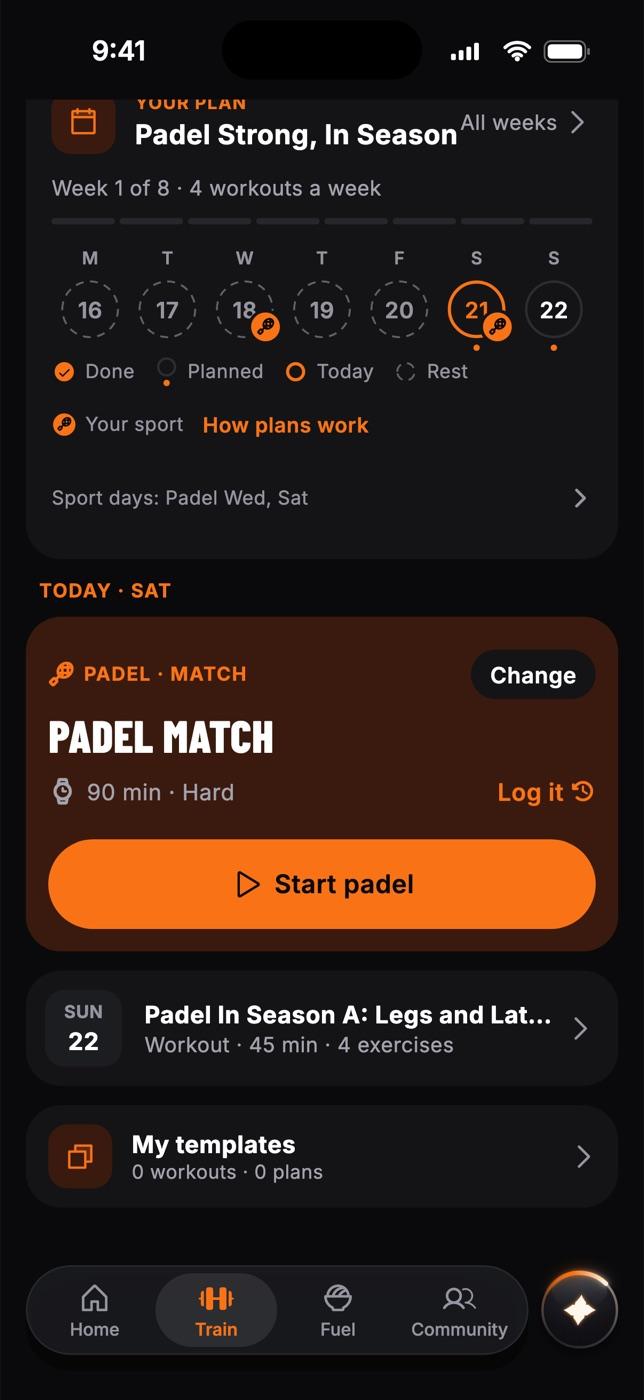
On a sport day, tap Train, then My plan. Under Today you see the sport card:
- At the top, the sport and the kind of session, for example "Padel · Match", or the name of the match you added in My sports.
- The session's name, how long it lasts and how hard it is.
- Start and the sport, for example Start padel, opens the activity for that sport so you can track it live.
- Log it adds a session you already played.
- Change opens the choices below.
When you log an activity of that sport on that day, from the app, your watch or another app that sends your workouts to Fit+, the card turns to Counted and shows the time and effort. Tap Progress on it to see how your plan is going. See See your progress.
Change today
Tap Change on the sport card. Change today opens.
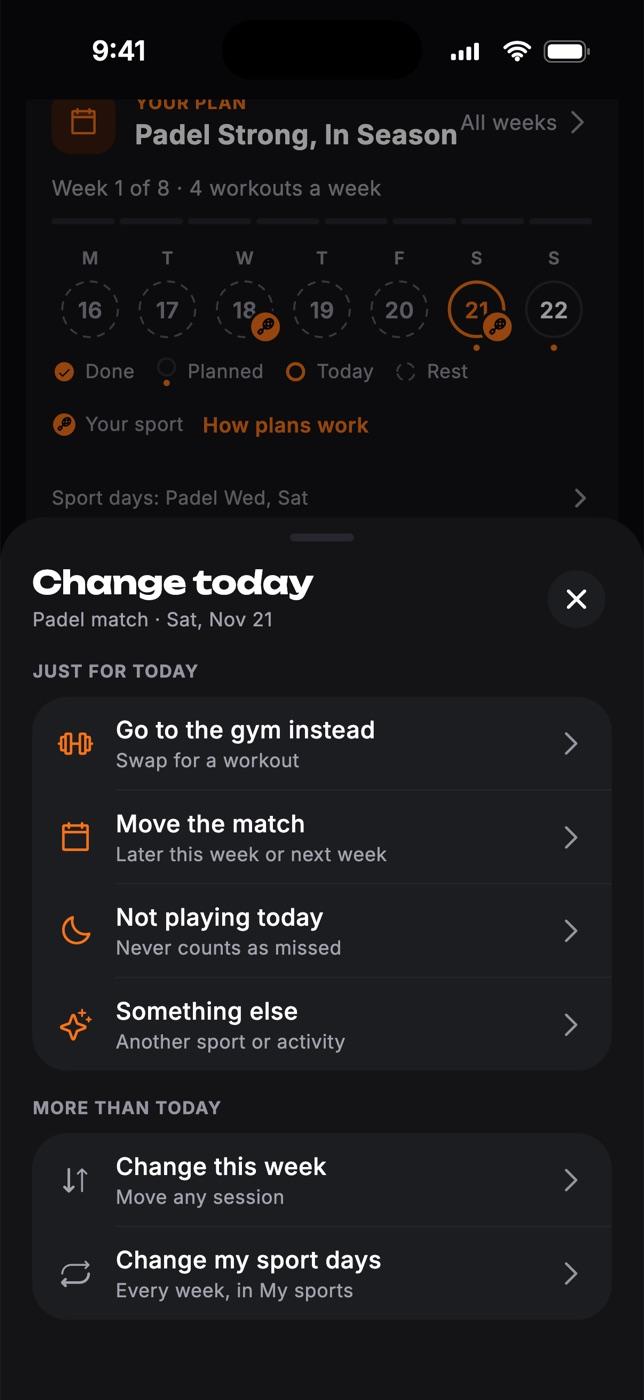
Under Just for today:
- Go to the gym instead: pick one of your plan's workouts, or Any workout from Library. If your sport is the next day, Fit+ suggests a lighter upper body day. Then answer And the match?: Not playing today, or Move it to another day. Tap Swap for today. Fit+ never picks for you, so the button waits until you choose.
- Move the match (or Move the session for practice): choose a day later this week, or Next week.
- Not playing today: the session reads Not played today. It never counts as missed.
- Something else: start another sport or activity instead.
Each change shows a message at the bottom of the screen. Changed your mind? Tap Undo in that message straight away.
Under More than today:
- Change this week: move any session of this week. See below.
- Change my sport days: change your usual days for every week, in My sports.
Change this week
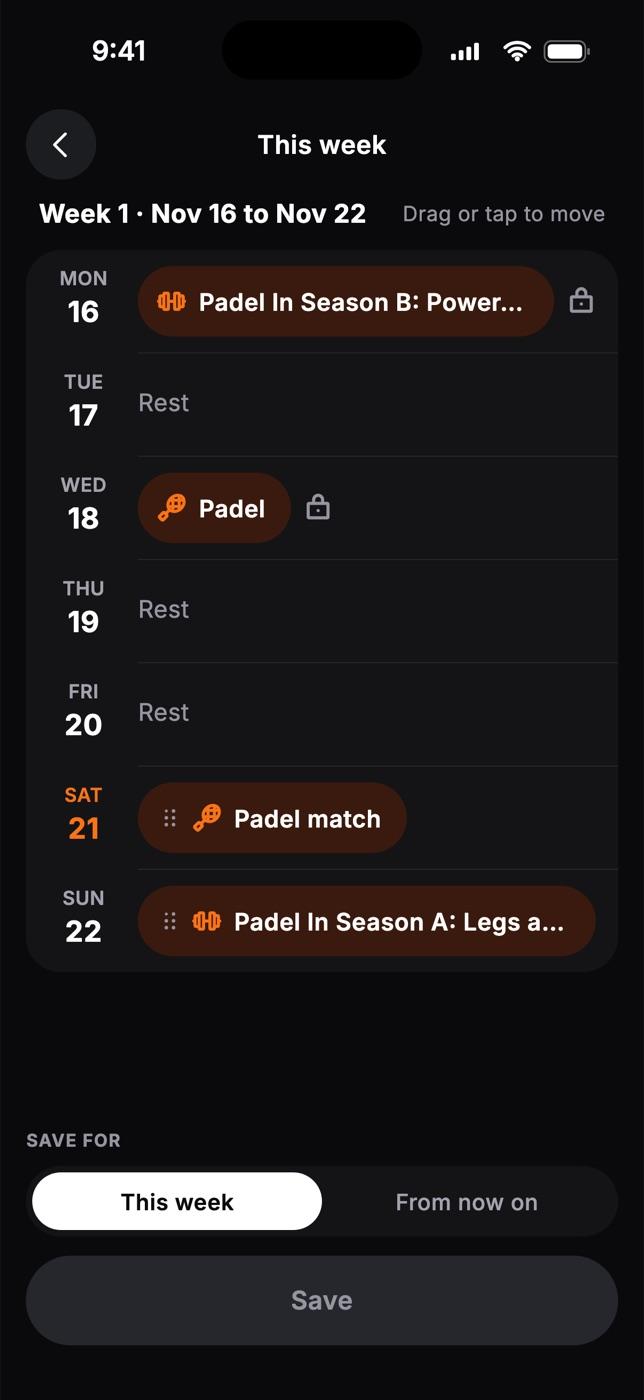
Tap Change on the sport card, then Change this week. This week opens with every day from Monday to Sunday.
Drag a session to another day, or tap it and pick the day. Days that are done or already past are locked.
If a move puts hard leg work on the day before a match, the day shows Day before your match in amber, with a one tap fix such as Move to another day. You can still keep your move.
Under Save for, choose This week to change only this week, or From now on to change the days for every week.
Tap Save, or Save anyway if an amber note is still showing.
With a coach's plan
If you follow a plan from your coach, your coach's sessions stay exactly as your coach wrote them. Your own sports are still yours to change, so the sport card and Change today still work for your sport days. In Change today:
- Turn on the switch with your coach's name, for example Tell Maya what changes today, to send your coach a short message about your change.
- Tap Ask and your coach's name, for example Ask Maya to move a session, to ask your coach to move one of their sessions.
- Change this week isn't there, because the week belongs to your coach's plan. Change my sport days still is.
When the season ends
A season plan repeats until you change it. When its weeks are done, My plan shows Season still on? with how many gym days and sport sessions you did. Choose:
- Keep and the season, for example Keep In season, to run the same plan again.
- The next plan, for example the off season plan, to move on.
Then tap Continue. Not sure yet? Tap In 2 weeks and Fit+ asks you again then.
Common questions
No. A sport day is never missed. It reads Not played today, and your week's count doesn't drop.
No. Fit+ suggests better days and explains why, but only you move a session.
This week moves the sessions for this week only. From now on changes which weekdays they fall on every week.