

Message members and your team
Chat one to one with members and your team, and pause a membership straight from a member's message.
Messages is where you chat with your members and the people on your team. Every conversation is between two people, and only those two can read it.
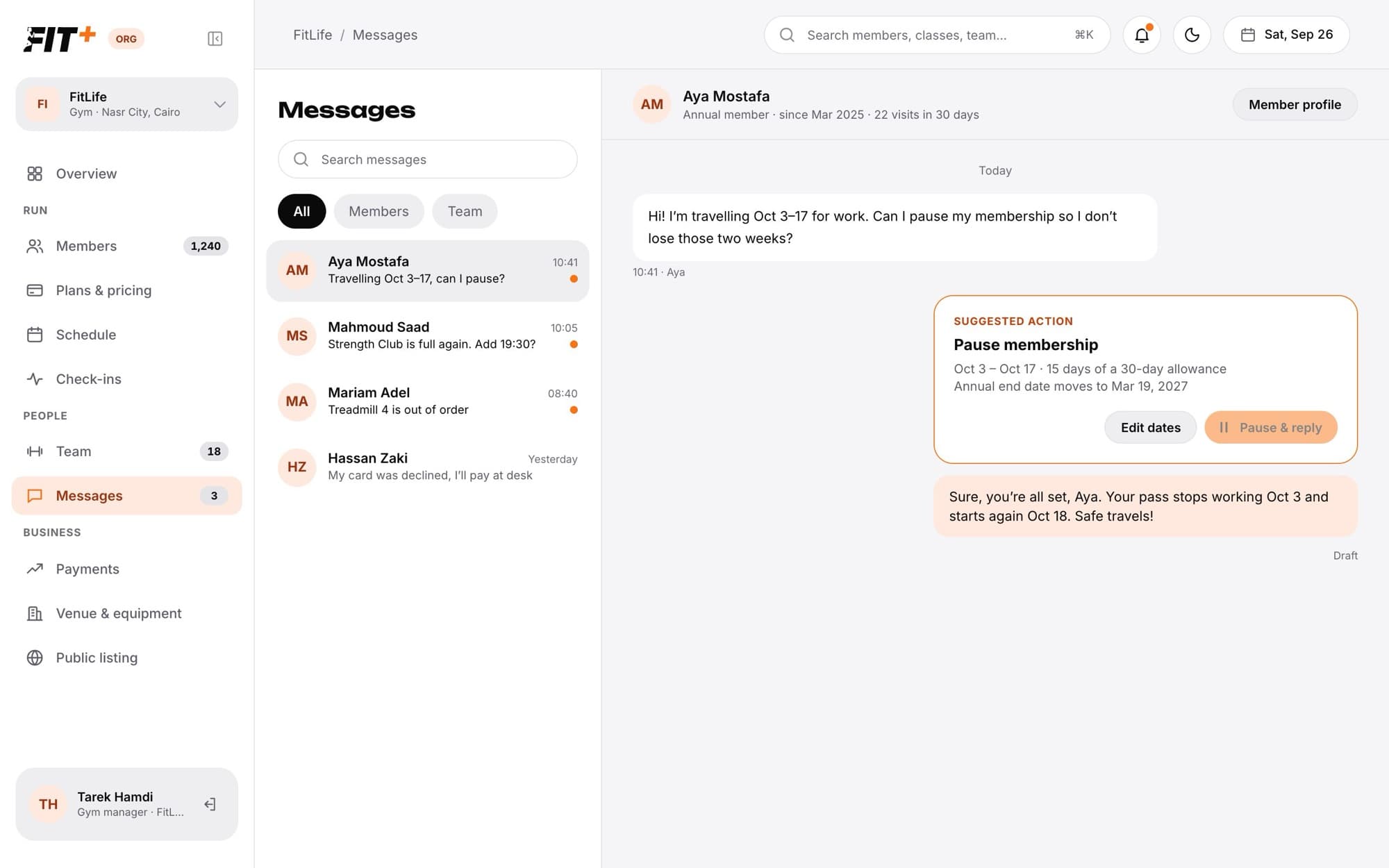
Send a message
To start a new conversation with a member, open their profile in Members and click Message. From a conversation, Member profile takes you back to their profile.
Only you and the other person can read a conversation. Owning or working at a gym never opens anyone else's messages, so there is no shared gym inbox.
Pause a membership from a message
When a member asks to pause, freeze or hold their membership and gives dates (for example "Can I pause Oct 3 to 17?"), Fit+ shows a Suggested action card in the conversation. It tells you:
- The dates, and how many of their yearly pause days this uses.
- The new end date of their membership.
- A ready-made reply, such as "Sure, you're all set. Your pass stops working Oct 3 and starts again Oct 18."
You need See and add members to see suggestions. Fit+ only suggests a pause when the member has an active plan that isn't already paused, and never guesses dates the member didn't write.
Common questions
No. Each person on your team only sees their own conversations.
The member asked for more days than their plan allows this year. Click Edit dates and choose a shorter pause, or let them know.
When you message the people booked into a class from the schedule, each member gets it as a message from you. Their replies arrive here.