

Find your way around
Your home page, the sidebar, search and the Create button in Fit+ Pro.
Your home page is the first thing you see when you sign in. It shows today's sessions, what is waiting for your decision and which clients need you, so you can plan your day at a glance.
Your home page
Select Overview in the sidebar to come back here at any time.
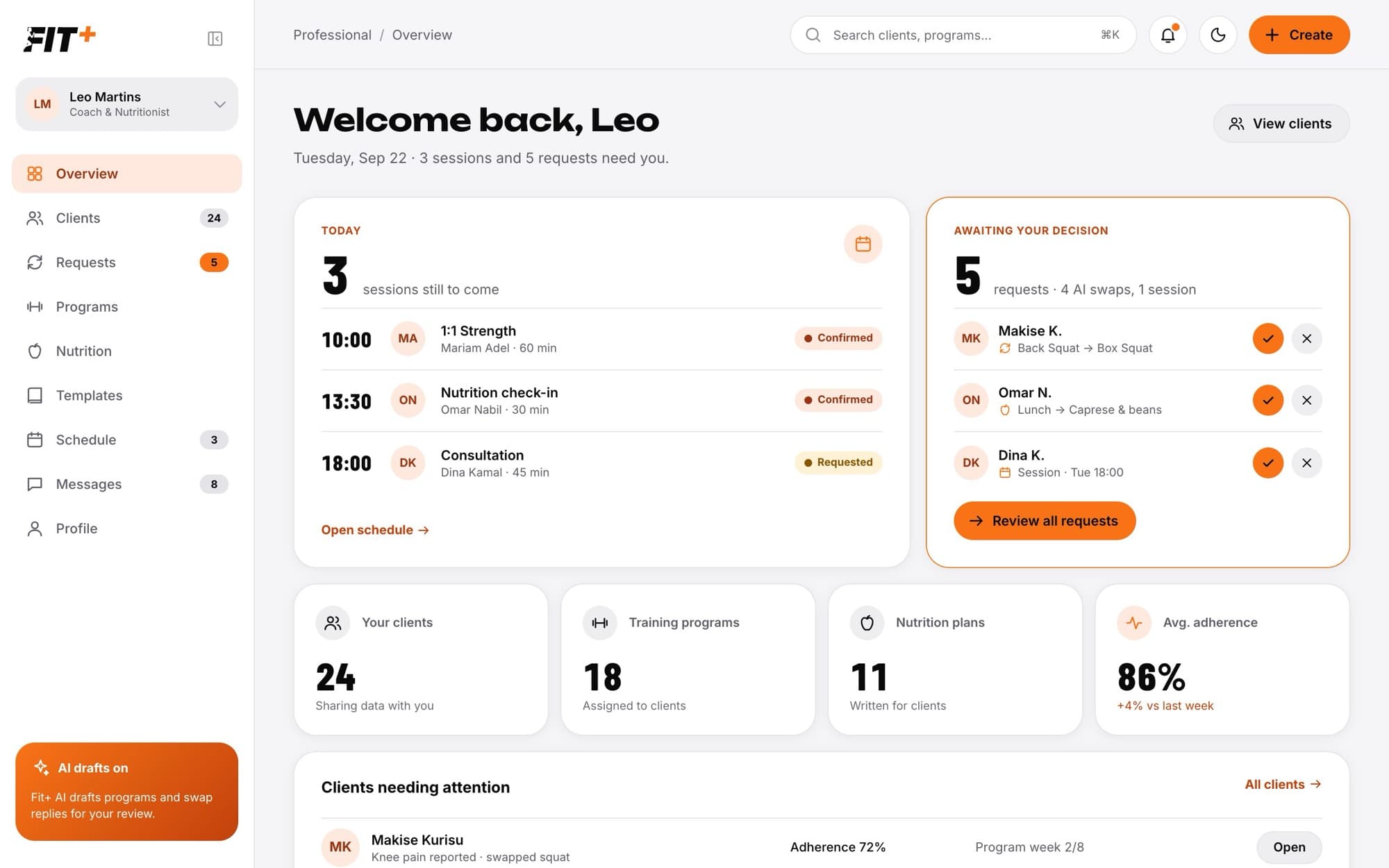
- Today lists the sessions booked with you today, with the time, client, length and whether they are Requested or Confirmed. Select Open schedule to see the whole week.
- Awaiting your decision lists swap and session requests. Select the tick to approve or the cross to decline right there, or Review all requests to see the details first.
- Your clients, Training programs (coaches), Nutrition plans (nutritionists) and Avg. adherence give you a quick count of your practice. Adherence shows how closely your clients follow their training, compared with last week. Nutritionists who don't coach see Requests instead of adherence.
- Clients needing attention lists clients with an open request, low adherence or low readiness, with the reason. Select Open to go to their profile.
Declining a session from your home page asks you to confirm first, because the client is told and the time becomes free again.
The sidebar
| Item | What it's for |
|---|---|
| Overview | Your home page |
| Clients | Everyone who shares data with you. The number is how many clients you have. |
| Requests | Swaps and session requests waiting for you. The orange number is how many are waiting. |
| Programs | Training programs (coaches only) |
| Nutrition | Nutrition plans, check-ins and your foods (nutritionists only). The orange number is how many check-ins are waiting for you. |
| Templates | Your reusable workouts, blocks, meals and plans |
| Exercise library | Every published Fit+ exercise, with technique videos |
| Schedule | Your sessions for the week. The number is today's sessions. |
| Messages | Chats with your clients. The number is conversations with unread messages. |
| Profile | Your public profile and offers |
Your name at the top of the sidebar shows your role. Select it to switch to another part of Fit+ you have access to, such as My fitness for your own training.
Search and create
- Search clients… at the top finds a client by name.
- The bell shows how many requests are waiting. Select it to open Requests.
- The moon switches between light and dark mode.
- Create starts something new: a Training program, a Nutrition plan or a Template.
You only see the tools for what Fit+ verified you for. Coaches see Programs, nutritionists see Nutrition, and professionals verified for both see both.
No. Nothing about your clients was changed. Select the button to try again. If it keeps happening, sign out and back in.