

Add a health reading
Record your weight, blood pressure, resting heart rate or body fat yourself.
No smart scale or watch? You can add readings yourself, and Fit+ uses them in your charts just like imported ones.
Add a reading
Tap Me, then My health, then the orange + button at the top. You can also tap the Weight tile on My health, or + on the Weight tile on Fuel.
Choose what to record: Weight, Blood pressure, Resting HR or Body fat.
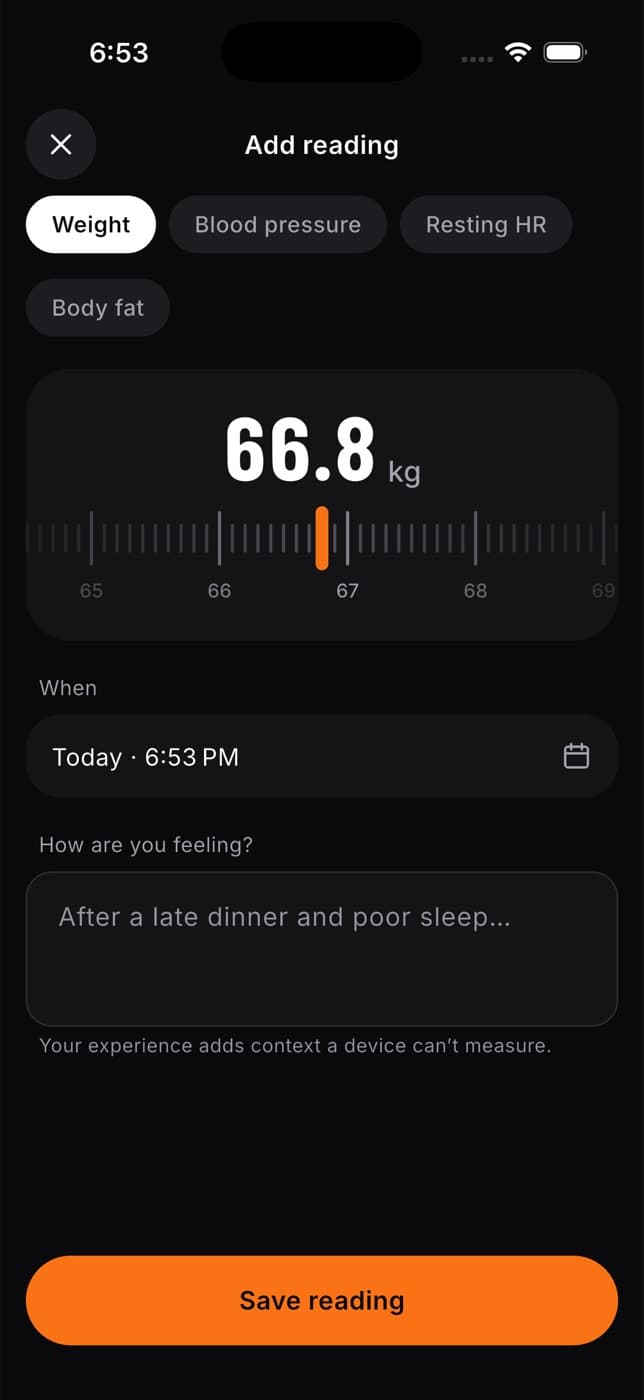
Set the value with the ruler or wheel. It starts from your last reading. Weight is shown in your units (kilograms or pounds). See Choose your units.
Check When. It's set to now. Tap it to pick another day and time, up to 60 days back.
Under How are you feeling?, add a note if you like.
Tap Save reading. You'll see "Reading saved".
What happens next
- Your reading appears in your charts on My health, and your weight also shows on Fuel.
- A new weight also updates the weight on your profile.
- If you share your body measurements or recovery data with your coach, they can see the reading too.
Tape measurements, such as your waist or hips, are kept separately. See Body measurements.
Common questions
Blood pressure readings are saved to your account, but there isn't a chart for them in the app yet.
Not in the app yet. Add a new reading with the right value. Fit+ shows the most recent reading for the day.
Weight from 30 to 200 kg (about 66 to 441 lb), blood pressure from 70 to 220 (top number) and 40 to 140 (bottom number), resting heart rate from 30 to 120 bpm, and body fat from 3 to 60%.
See your health metrics
Follow your recovery, sleep, heart rate, HRV, weight, steps, training load and heart-rate zones over 7, 30 or 90 days on your Health screen.
Track your progress
See your training calendar, progress charts, muscle volume and weekly report, and keep private body measurements and progress photos in the Fit+ app.