

Connect WHOOP
Link your WHOOP account to Fit+ on your phone, sync your WHOOP data and disconnect it again.
If you wear a WHOOP, you can connect your WHOOP account to Fit+. Fit+ imports your recovery, HRV, resting heart rate, sleep, strain and workouts from the last 30 days.
Connect WHOOP
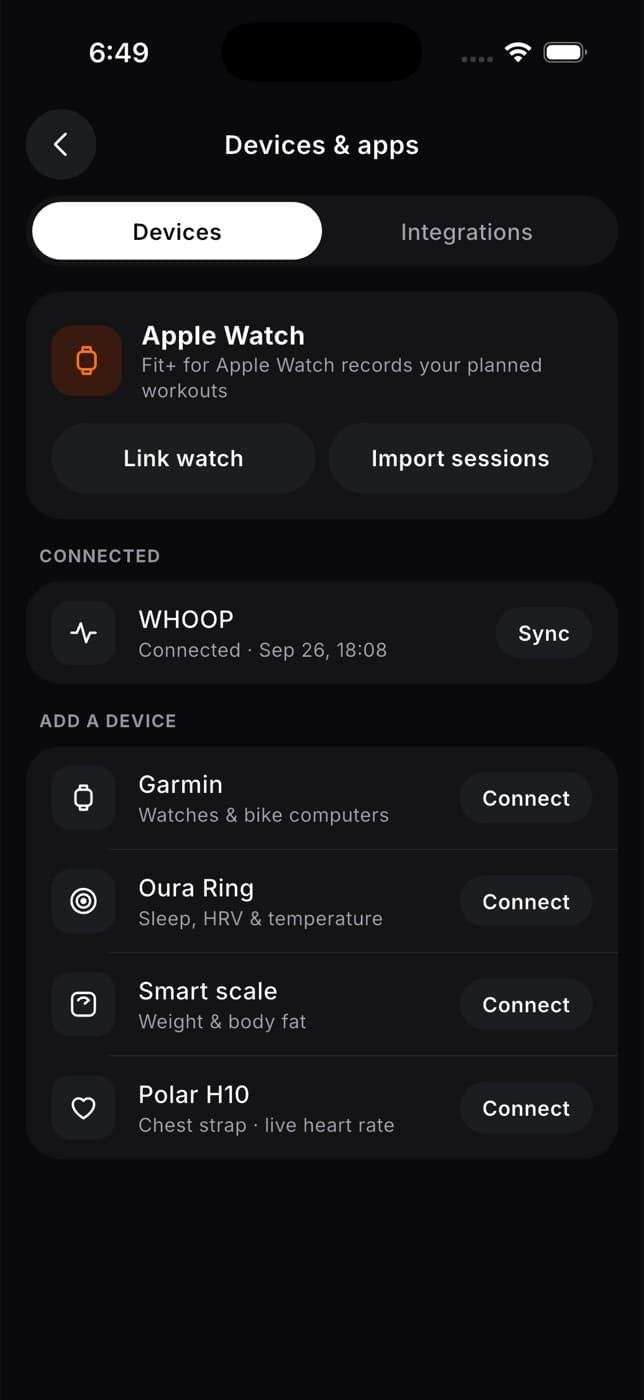
Tap Me, then Devices & apps. Stay on the Devices tab.
Under Add a device, tap WHOOP (or its Connect button). The WHOOP screen opens.
Tap Connect WHOOP. WHOOP opens so you can sign in to your WHOOP account there and allow access.
Come back to Fit+. While Fit+ waits for WHOOP, you see Finish in WHOOP. When WHOOP confirms, Fit+ imports your data on its own and shows "WHOOP sync completed."
If Fit+ still says WHOOP hasn't confirmed, finish allowing access in WHOOP, then tap Refresh connection.
Once connected, WHOOP moves under Connected on the Devices tab, with the date and time of the last sync.
Sync WHOOP
Fit+ brings in new WHOOP data when you sync. To sync:
- Tap Sync next to WHOOP on the Devices tab, or
- Tap WHOOP to open its screen, then tap Sync now.
The WHOOP screen shows your connection status and Last sync, with the date and time.
How Fit+ uses your WHOOP data
WHOOP scores keep their WHOOP meaning. Fit+ doesn't recalculate them:
- Your WHOOP recovery is used as your readiness score for the day.
- Your WHOOP strain shows as your strain, and a hard day adds a little to the sleep you need tonight.
- Your HRV, resting heart rate and sleep show on My health with your other data.
Disconnect WHOOP
Tap Me, then Devices & apps, then WHOOP.
Tap Disconnect.
Confirm with Disconnect. Fit+ stops importing from WHOOP.
Readings Fit+ already imported stay in your history.
Common questions
WHOOP needs your permission again. Open the WHOOP screen and tap Reconnect WHOOP, then allow access in WHOOP.
Wait a moment, then try again.
Fit+ couldn't start the connection right now. Try again later.
Not for your WHOOP data. You can connect both: Apple Health or Health Connect brings in steps, weight and data from your other devices.
Only you, unless you share it in Me, then Data sharing.
Connect Apple Health or Health Connect
Let Fit+ import your sleep, heart rate, steps and other health data from Apple Health on iPhone or Health Connect on Android, and keep it up to date.
Check your readiness
Understand your daily readiness score, get advice on how hard to train and fine-tune it with a morning check-in.