

Understand your sleep
See last night's sleep score and what shaped it, how much sleep you need tonight, your sleep debt and a suggested bedtime, and set your sleep goal.
Fit+ scores each night of sleep against what you needed, and tells you how much to sleep tonight and when to go to bed. It compares you with your own goal, never with other people.
Fit+ needs sleep data from your watch, ring or phone. Connect Apple Health or Health Connect, or WHOOP.
Open your sleep
Tap Me, then My health, then the Sleep tile. You can also tap the Sleep stages card further down My health.
On Home, the readiness card shows last night's sleep and its score.
Your sleep score
At the top, a ring shows last night's Sleep score from 0 to 100, with a label and how long you slept:
| Score | Label |
|---|---|
| Over 85 | Good |
| 70 to 85 | Fair |
| Under 70 | Poor |
Under What shaped it, you see each part of the score:
- Time asleep: how long you slept against what you needed. This counts most.
- Deep and REM: how much of your sleep was deep or REM sleep.
- Asleep while in bed: how much of your time in bed you spent asleep.
- Unbroken sleep: how often you woke up, or how long you were awake.
- Heart rate dip: how far your heart rate dropped below your daytime average.
Fit+ only shows the parts your device records. If it only knows how long you slept, you see "Based on time asleep only." Wear your watch to bed to add sleep stages and heart rate.
If last night's sleep hasn't reached Fit+ yet, the score shows once it syncs.
Tonight: sleep needed, sleep debt and bedtime
Under Tonight, Fit+ shows three numbers:
- Sleep needed: how much to sleep tonight. It starts from your sleep goal and adds a little after a hard day (Extra for today's strain) and to make up for short nights (Paying back sleep debt). The card below shows how it adds up.
- Sleep debt: how much sleep you've missed over the last 7 nights. A long night pays debt back, but you can't bank sleep ahead. Fit+ adds a quarter of your debt to tonight's need, up to an hour, so you catch up gradually.
- Bedtime: when to be in bed to wake at your usual time with the sleep you need. It allows for the time you usually take to fall asleep.
Fit+ suggests a bedtime after 3 nights of sleep data, once it knows when you usually wake up.
Your week of sleep
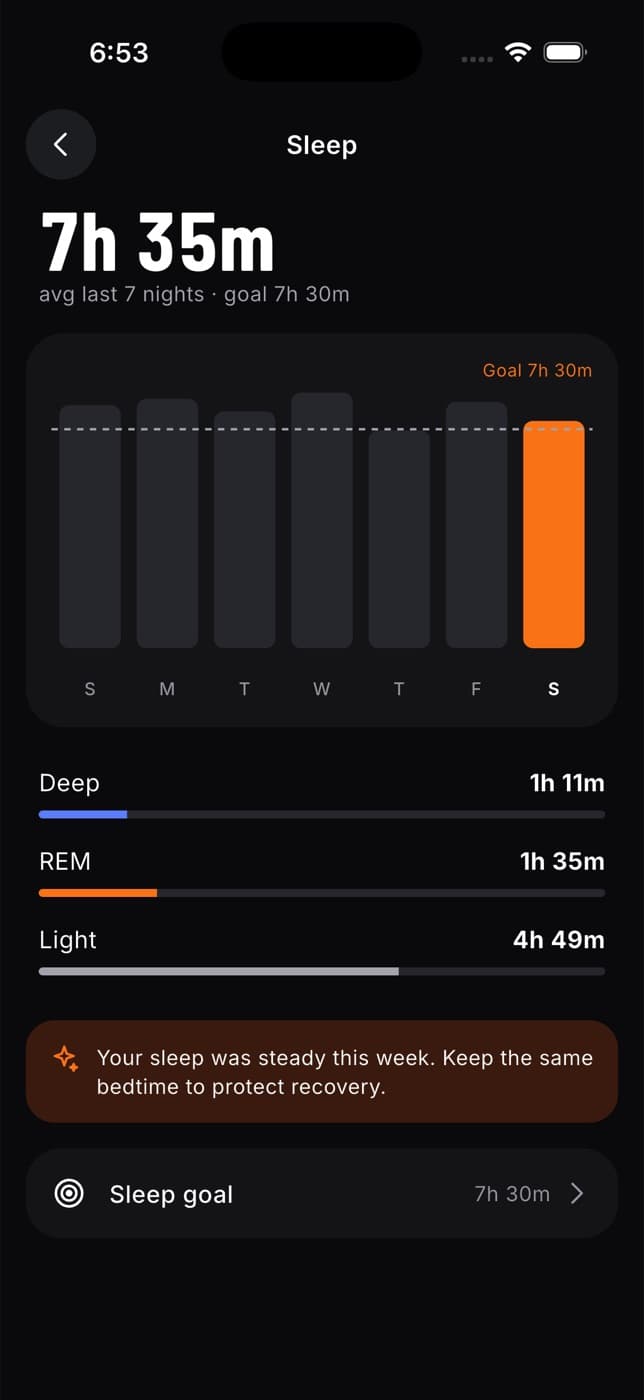
Below, you see:
- Your average sleep over the last 7 nights, and your goal.
- A bar for each night, against a dashed line for your goal. Last night is highlighted, and a night without data shows an empty outline.
- Your average Deep, REM, Light and Awake time, when your device records sleep stages.
- After 4 nights, a tip about your sleep. For example, whether late meals (logged in Fuel at 9 pm or later) came before your shortest nights, or how steady your sleep was.
- How your sleep score works, a short explanation of the score and of sleep needed.
Set your sleep goal
On your sleep screen, tap Sleep goal.
Choose how much sleep you're aiming for, from 6 h 30 m to 9 h. It starts at 7 h 30 m.
Your goal is the starting point for Sleep needed, your sleep score and your readiness.
Common questions
Fit+ doesn't have any sleep data yet. See Connect Apple Health or Health Connect.
Fit+ needs at least 3 nights from the last two weeks where your device recorded when you woke up.
Not in the app. Sleep comes from your device through Apple Health, Health Connect or WHOOP. Without a device, the Sleep tile shows the sleep quality from your morning check-in instead.
Only if you share Sleep with them in Me, then Data sharing.