

Connect Apple Health or Health Connect
Let Fit+ import your sleep, heart rate, steps and other health data from Apple Health on iPhone or Health Connect on Android, and keep it up to date.
Connect the health app on your phone, and Fit+ imports your sleep, heart rate, steps, weight and workouts. If your watch, ring or scale saves its data to Apple Health or Health Connect, it reaches Fit+ this way too.
Before you start
- On iPhone, you use Apple Health, which is already on your phone.
- On Android, you need the Health Connect app. If Fit+ asks you to, install or update it from Google Play, then try again.
- Connect from the Fit+ app on your phone. You can't connect from a tablet or computer.
Connect your health app
Tap Me, then Devices & apps, then the Integrations tab.
You can also open My health and tap the watch button at the top. This opens Devices & data, where Apple Health or Health Connect is listed under Apps & integrations.
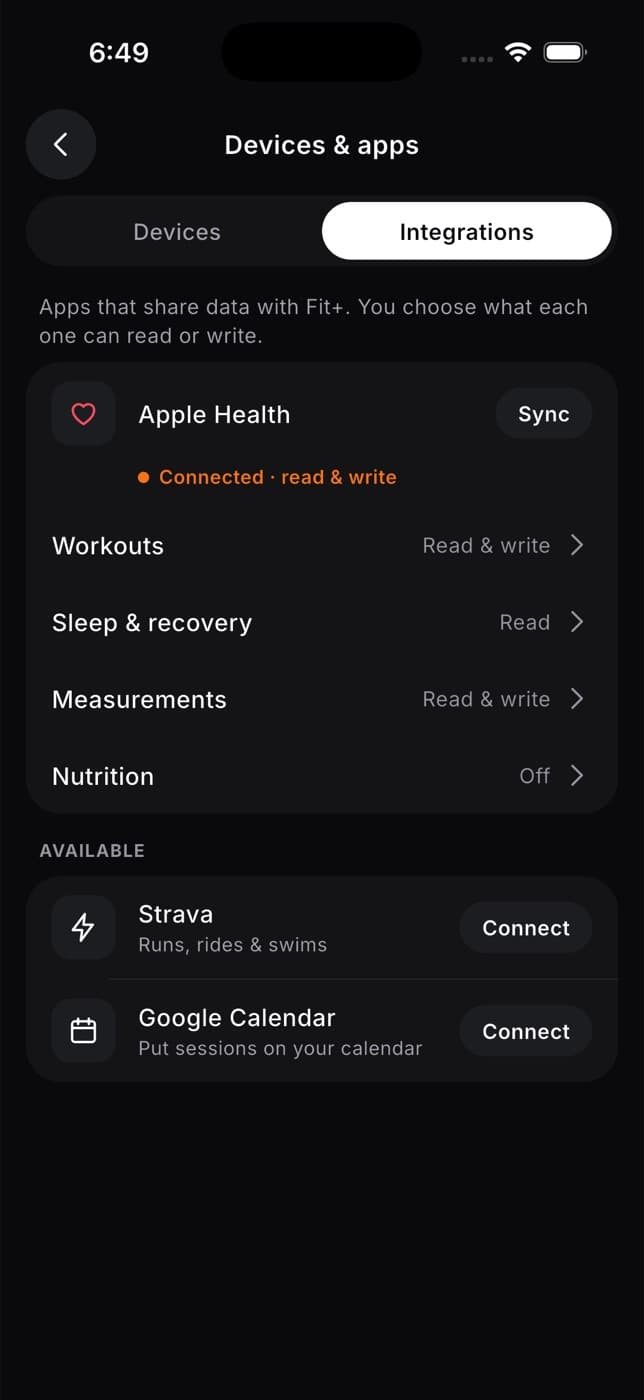
Tap Connect next to Apple Health or Health Connect.
The first time, Fit+ explains what it will import. Tap Connect Apple Health (or Connect Health Connect) to go on, or Not now to stop.
Your phone asks which data Fit+ may read. Turn on the types you want to share, then allow access.
Fit+ imports the last 30 days and tells you how many readings it brought in, for example "240 readings imported."
What Fit+ imports
| Type | What Fit+ reads | What it's used for |
|---|---|---|
| Activity | Steps, active calories, distance, flights climbed, exercise minutes | Your daily averages on My health |
| Heart | Heart rate, resting heart rate, HRV | Your readiness, your trends and the heart-rate zones of imported workouts |
| Recovery | Breathing rate, blood oxygen, body temperature | The Health monitor on your readiness screen |
| Sleep | Time asleep, sleep stages (deep, REM, light), time awake and time in bed | Your sleep score, sleep needed and readiness |
| Body | Weight, height, body fat | Your weight trend and body measurements |
| Workouts | Workouts recorded by other apps and devices, with their heart rate | Your heart-rate zones for the week |
Some types are only available on iPhone (flights climbed and exercise minutes). If you don't allow a type, Fit+ simply skips it.
The Fit+ phone app only reads your health data. It never changes anything in Apple Health or Health Connect. On iPhone, Fit+ for Apple Watch saves the workouts you record with it to Apple Health, like any workout app. See What gets saved.
What Fit+ reads on Android, and why
On Android, Health Connect can show you Fit+'s own explanation, a screen called Fit+ and Health Connect. It lists every type of data Fit+ can ask for and what each one is for. In short:
- Steps and distance: your daily steps and distance in My health, and the distance of imported workouts.
- Active calories and total calories burned: your daily active energy in My health, and the calories of imported workouts.
- Exercise sessions: workouts recorded by your watch or other apps, with their type, duration, distance and calories.
- Heart rate: your daily heart rate trend, and the time you spend in each heart-rate zone during imported workouts.
- Resting heart rate and heart rate variability: your daily readiness score and recovery trends, compared with your own 30-day normal.
- Sleep: sleep duration, sleep stages and your sleep score. Last night's sleep also counts toward readiness.
- Respiratory rate, oxygen saturation and body temperature: recovery trends in My health, compared with your own normal.
- Weight, height and body fat: your body measurements and progress over time. Your latest weight also keeps your nutrition targets up to date.
The same screen explains that Fit+ only reads, never writes, that it doesn't sell your health data or use it for advertising, and that coaches, nutritionists and gyms see nothing unless you share it. Tap Manage access in Health Connect to change what Fit+ may read, or Read the privacy policy for the full details.
Keep your data up to date
After you connect, Fit+ refreshes your data by itself whenever you open the app, at most once an hour. It never asks for new permissions when it does this.
- To update now, tap Sync next to Apple Health or Health Connect.
- To stop automatic updates, open My health, tap the watch button and turn off Import automatically. You can still tap Sync whenever you like.
Fit+ only imports while the app is open. If something looks out of date, open Fit+ or tap Sync.
Link your Apple Watch
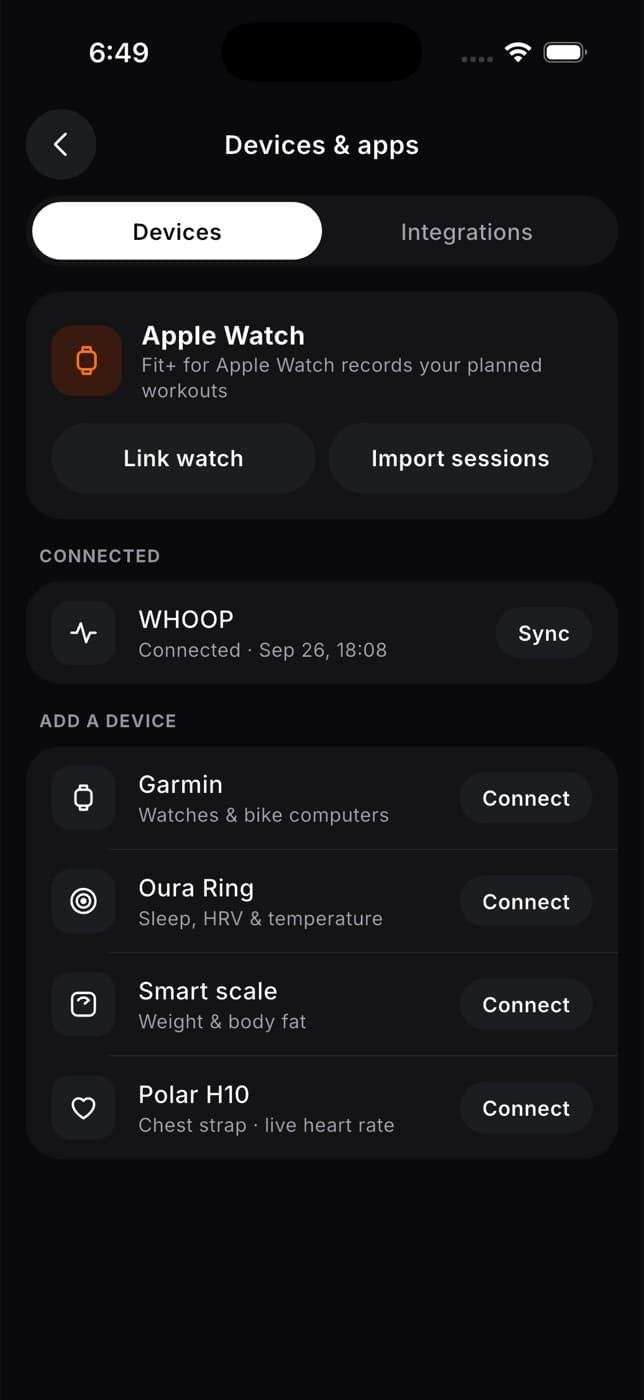
On the Devices tab of Devices & apps, tap Link watch to use Fit+ for Apple Watch, or Import sessions to bring in workouts you recorded on the watch. See Apple Watch.
Other devices
- WHOOP connects to Fit+ directly. See Connect WHOOP.
- Garmin, Oura Ring, smart scales and Polar H10 can't connect to Fit+ directly yet. If you tap Connect, Fit+ tells you so. Sync them with Apple Health or Health Connect, and Fit+ imports their data from there.
Stop importing
- Open My health, tap the watch button and turn off Import automatically.
- Remove Fit+'s access in your phone's health settings (Apple Health on iPhone, Health Connect on Android). Fit+ stops reading a type as soon as you remove it.
Readings Fit+ already imported stay in your account. Deleting your Fit+ account removes them.
Common questions
On iPhone, this usually means Fit+ isn't allowed to read your data. Open the Health app, go to your sharing settings for apps, choose Fit+ and turn on the data types. Then tap Sync again. It can also mean there's no data on your phone yet.
Allow Fit+ in your phone's health settings, then tap Sync again.
Install or update Health Connect from Google Play, then tap Connect again.
No. Fit+ uses your phone's own daily totals, which already combine your phone and watch.
No. Workouts you record with Fit+ for Apple Watch are already in your Fit+ history, so Fit+ doesn't import them again from Apple Health.
Only you, unless you share it. You choose what to share, and with whom, in Me, then Data sharing. See Sharing and consent.