

Apple Watch
Train from your wrist with Fit+ for Apple Watch, with your planned workout, set logging, rest timer and heart rate.
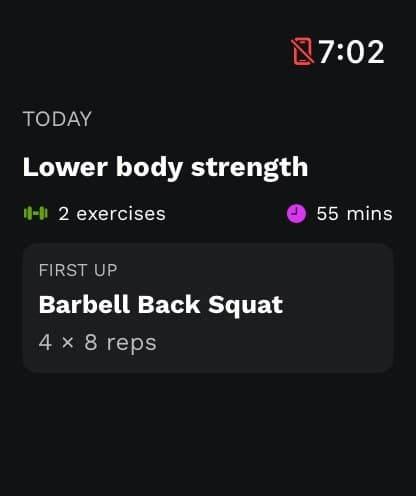
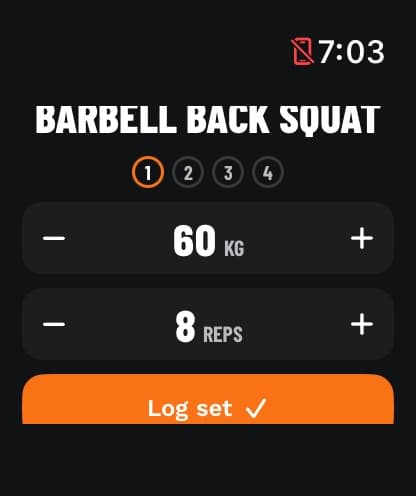
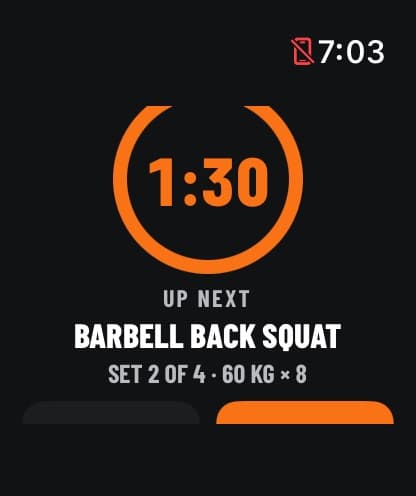
Fit+ for Apple Watch lets you follow your planned workout from your wrist. Log each set, rest with a timer that taps you when it's time to go, and see your heart rate as you train. Finished workouts are saved to Apple Health and your Fit+ history, and your heart rate becomes time in heart-rate zones on My health.
What you need
- An iPhone with Fit+, signed in to your account.
- An Apple Watch paired with that iPhone, running watchOS 10 or later.
What you can do
- See today's planned workout on your watch.
- Start it from your watch, with or without your iPhone nearby.
- Log sets, adjust weight and reps, and rest between sets.
- Record a free Strength, Run, Cycle or Mobility workout.
- Save workouts to Apple Health and bring them into your Fit+ history, with the time you spent in each heart-rate zone.
Set up Fit+ on Apple Watch
Install, allow Health access and link your watch.
Train with your Apple Watch
Start a workout, log sets, rest, pause and finish.
What your watch saves
Fit+ history, Apple Health, heart-rate zones and importing watch workouts.
Common questions
No. If your iPhone isn't nearby, your watch records the workout on its own. Import it into Fit+ later from Me, then Devices & apps.
The watch app is for your own training. Coaching and gym tools are on your phone and on the web.