

What your watch saves
Where your Apple Watch workouts are saved, in your Fit+ history and in Apple Health, how your heart rate becomes heart-rate zones, and how to bring watch-only workouts into Fit+.
Every workout you finish with your Apple Watch is saved to Apple Health. Whether it also appears in your Fit+ history straight away depends on where the workout ran.
Workouts that ran on your iPhone too
If you started the workout with your iPhone nearby, or started it on your iPhone, the phone is in charge.
- When you save the workout on your iPhone, it goes into your Fit+ workout history, with your sets, effort and notes.
- Your watch saves the same workout to Apple Health, with your heart rate and calories.
- Your watch then sends the heart rate it read to your iPhone, and Fit+ adds your time in each heart-rate zone to the workout.
- Your watch summary says Saved in Fit+ and Health.
If you discard the workout on your iPhone, nothing is saved anywhere and your watch goes back to Today.
Workouts recorded on your watch only
If your iPhone wasn't nearby, or you started a free workout (Strength, Run, Cycle or Mobility), your watch records the workout on its own.
- When you tap Save workout, your watch saves it to Apple Health first. The summary shows your calories and Saved to Health.
- Your watch then sends the workout to your iPhone, even if your phone was out of reach. It waits there until you bring it into Fit+.
Bring watch workouts into Fit+
On your iPhone, tap Me, then Devices & apps.
On the Apple Watch card, tap Import sessions.
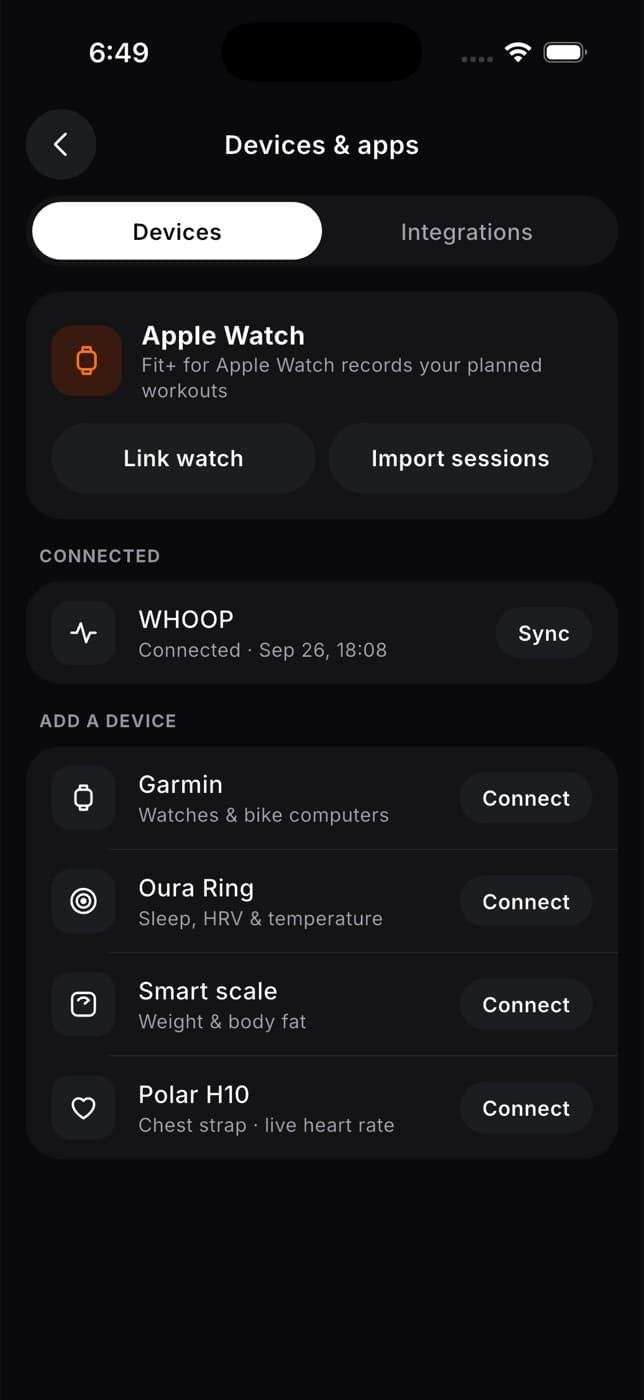
Fit+ tells you how many watch workouts it added. They appear in your workout history with "on Apple Watch" in their name, and the note "Recorded on Apple Watch.".
Watch-only workouts don't appear in your Fit+ history until you tap Import sessions. Do this after training so your streaks, badges and coach see them.
What's saved where
| Fit+ workout history | Apple Health | |
|---|---|---|
| Sets, reps and weights | Yes | No |
| Session effort | Yes | No |
| Heart rate | Time in each heart-rate zone | Every reading |
| Calories | For watch-only workouts | Yes |
| Workout time | Yes | Yes |
Heart-rate zones
Fit+ turns the heart rate your watch read during a workout into the time you spent in five zones, from easy (zone 1) to all-out (zone 5). Only the time in each zone is saved with your Fit+ workout. Your individual heart-rate readings stay on your watch and in Apple Health.
| Zone | Share of your maximum heart rate |
|---|---|
| 1 | 50 to 60% |
| 2 | 60 to 70% |
| 3 | 70 to 80% |
| 4 | 80 to 90% |
| 5 | 90% and above |
Fit+ estimates your maximum heart rate as 220 minus your age. If it doesn't know your age, it uses 190.
To see your zones, tap Me, then My health, and look for Heart-rate zones · this week. It adds up your Fit+ workouts and workouts other apps saved to Apple Health. See See your health metrics.
Your heart-rate zones are health data. They're private unless you share your health with someone, such as your coach.
Common questions
No. Importing the same watch workout again updates it rather than adding a copy, and Fit+ doesn't import its own watch workouts a second time from Apple Health.
The workout wasn't saved, and it hasn't been marked as done in Fit+. Check that Fit+ is allowed to save workouts in the Health app on your iPhone.
Watch workouts are only imported into the account that was linked when you recorded them. Sign back in to that account to import them.
Train with your Apple Watch
Start a planned workout on your Apple Watch, log sets, rest, pause and finish your workout from your wrist.
Your profile and settings
Find your way around the Me tab and Settings, edit your profile and photo, choose dark or light mode and your language, manage your privacy and usage analytics, get help and delete your account.