

See your workout history
Look back at your finished workouts week by week, open any workout to see every set, add notes, repeat it and read your coach's feedback.
Every workout you finish is kept in Fit+. This page shows where to find your past workouts, what each one shows and how to do one again.
Open your workout history
Open Train and tap Workout history. The card shows how many sessions you've logged.
History lists your workouts by week, newest first: This week, Last week, then Week of and the date. Each week shows how much you lifted in total.
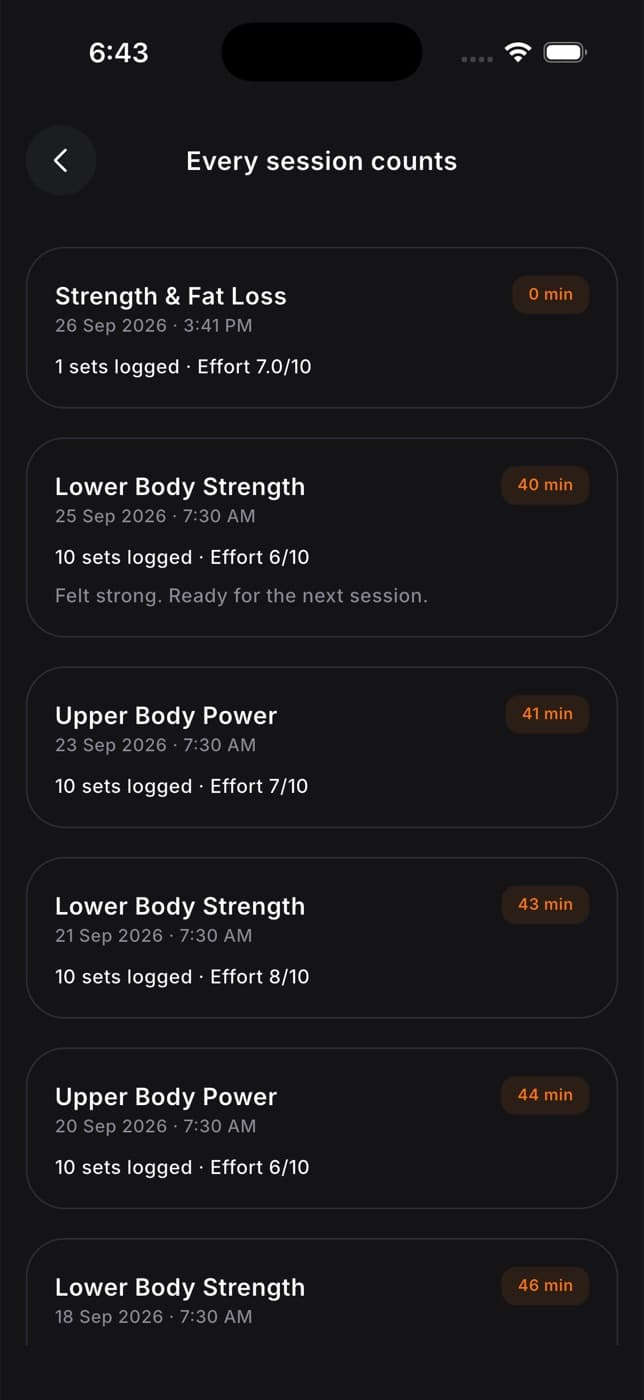
Each workout shows its name, the day, how long it took and how much you lifted (or how far you went, or how many sets you did). A PR badge shows how many personal records you set in it.
Tap Calendar at the top to see your workouts as dots on a month calendar, with your workouts, training time and weight lifted for the month. Tap List to go back.
A workout you saved without a connection shows Waiting to sync until Fit+ has sent it.
Before your first workout, History shows No workouts yet with Start a workout, and Import from another app if you'd like to bring in workouts you logged elsewhere.
Open a past workout
Tap a workout in your history to see:
- the date, time and, if you trained at a gym, where
- the plan it came from, such as "From Coach Leo · Strength, week 2"
- your Time, volume (in your weight unit, kg or lb), Sets and PR count
- Your notes on the workout
- every exercise with each set you logged, its volume and a PR badge on record sets
- any note you left on an exercise for next time
Weights, distances and volume follow your units.
Add or change your notes
Tap Your notes (or Add notes about this workout.), type your note and tap Save. Only you, and people you share training with, can see notes.
Repeat a workout
Tap Repeat this workout at the bottom. After the 3, 2, 1 countdown, the same workout starts in the player. If you still have the plan it came from, Fit+ uses that day of the plan. Otherwise it uses the moves and weights you logged.
Edit or delete a workout
Tap Edit at the top of a past workout to fix its date, duration, sets or exercises, or to delete it. See Edit or delete a past workout.
Other places to see your progress
| Where | What you see |
|---|---|
| Home, today's workout card | "Done" with the time and sets once you've trained today. Tap View summary to see the summary again. |
| Train, This week | A tick and the time on each day you trained |
| A move's guidance page, History tab | Your best set and your recent sessions with that move |
| Exercise library, a move, History and Records | Your progress on the move over time and your personal records. See Browse the exercise library. |
| Me, Achievements | Badges, streaks and records |
Your best set is worked out from the weight and reps together, as an estimated one-rep max (the most you could lift once). For timed moves, it's your longest time. Warm-up sets never count toward your volume or records.
Read your coach's feedback
If you share your workouts with a coach, they can review a session and leave feedback.
When your coach reviews a workout, Home shows Feedback from your coach with the workout name. Tap it.
Read your coach's message, then scroll to Per exercise to see their comment on each move, next to your sets, reps and top weight.
Tap Reply to your coach to answer them in a chat.
Common questions
If you saved it without a connection, it shows Waiting to sync and is sent once you're online. Open the app while you're online.
Yes. Open it and tap Edit. See Edit or delete a past workout.
Yes. They stay in your history. Only workouts from your current program tick off days in This week.
Workouts that ran on your phone are saved as usual. Workouts recorded on your watch alone appear once you import them. See What your watch saves.
Set your rest timer and progression
Choose your default rest times, what happens while you rest, and how Fit+ suggests your next weights in your own routines.
Edit or delete a past workout
Fix the date, length, sets, reps and weights of a workout you already saved, add a move you forgot, or delete the workout.