

See your health metrics
Follow your recovery, sleep, heart rate, HRV, weight, steps, training load and heart-rate zones over 7, 30 or 90 days on your Health screen.
Your Health screen shows your key health numbers at a glance and how they're changing. Use it to spot trends in your sleep, heart and body over time.
Open your Health screen
Tap Me, then My health.
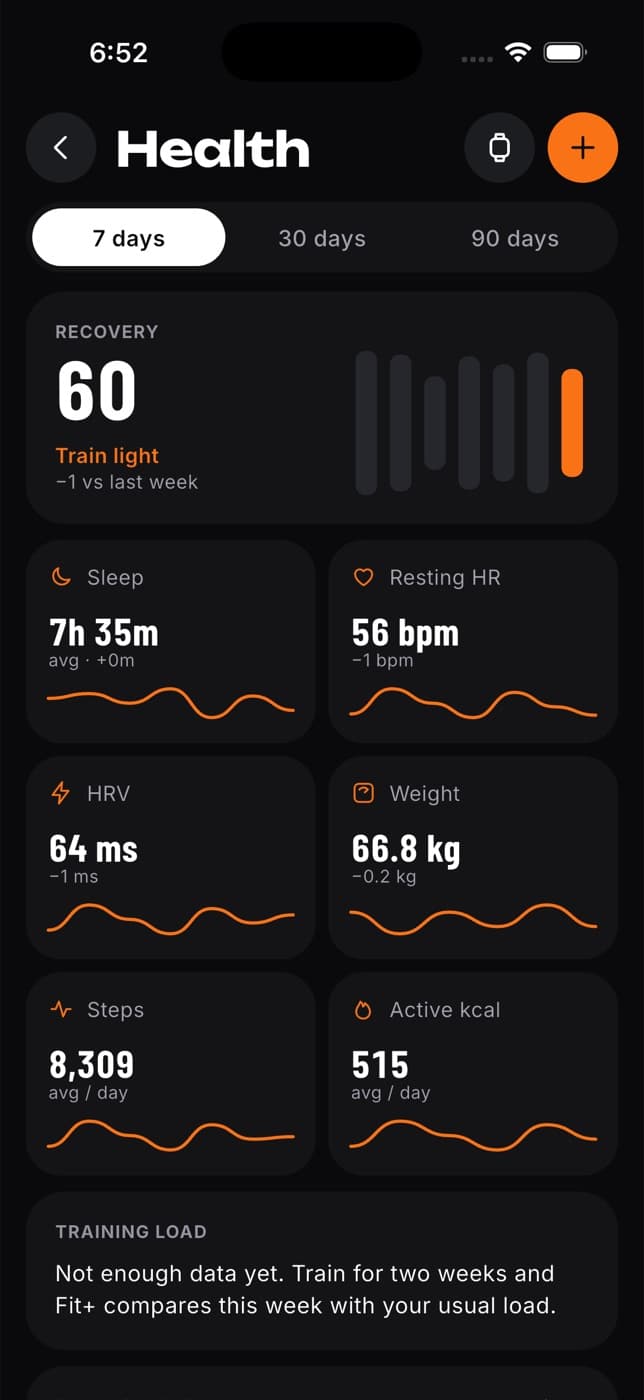
At the top:
- The watch button opens Devices & data, where you connect and sync your health app. See Connect Apple Health or Health Connect.
- The orange + button adds a reading. See Add a health reading.
- Choose 7 days, 30 days or 90 days. Everything on the screen updates to that range.
What you see
- Recovery: your readiness score for today (or your average over 30 or 90 days), with advice and how it compares with the period before. Tap it to open your readiness.
- Sleep: your average sleep. Without a device, it shows the sleep quality from your morning check-in. Tap it to open your sleep.
- Resting HR and HRV: your latest reading and how your average has changed.
- Weight: your latest weight, in your units. Tap it to add a new reading.
- Steps and Active kcal (or kJ, if you use kilojoules): your daily average.
- Training load: how much you trained in the last 7 days compared with your usual 4 weeks, rated Low, Optimal or High, with advice. You need about two weeks of workouts before this appears.
- Sleep stages: your deep, REM and light sleep for each of the last 7 nights, against what you need. Tap it to open your sleep.
- Heart-rate zones · this week: time spent in each zone since Monday. See below.
- Who can see my data?: who you share your health with. Tap it to manage sharing.
- Morning check-in: a quick way to rate how you feel today.
- Measurements and Progress photos: your tape measurements and private photos. See Body measurements and Progress photos.
A dash means there's no data for that metric yet.
Heart-rate zones
The Heart-rate zones · this week card shows how many minutes you spent in each of five zones since Monday, from:
- workouts you recorded with Fit+ that have heart rate, such as on Apple Watch, and
- workouts other apps and devices saved to Apple Health or Health Connect.
Each zone is a share of your maximum heart rate. Fit+ estimates your maximum as 220 minus your age.
| Zone | Share of your maximum heart rate |
|---|---|
| Z1 | 50 to 60% |
| Z2 | 60 to 70% |
| Z3 | 70 to 80% |
| Z4 | 80 to 90% |
| Z5 | 90% and above |
Time below zone 1 isn't counted. The card only appears once a workout this week has heart-rate data.
Common questions
Fit+ hasn't received that kind of data yet. Check that you allowed it in your phone's health settings, then tap Sync in Me, Devices & apps, Integrations.
Only Recovery, Sleep, Weight and the Sleep stages card open another screen at the moment.
Not yet. Readings can't be deleted from the app.