

Choose or follow a meal plan
Start a Fit+ meal plan, have Fit+ AI draft one from your answers, or follow the plan your nutritionist assigned, and understand your daily targets.
A meal plan gives you daily targets for calories, protein, carbs, fat and water, and a set of meals to eat. You can start one of the Fit+ plans yourself, have Fit+ AI draft one for you, or follow a plan from your nutritionist.
Don't want a set menu? You can set your own goal instead and still get daily targets.
Start a Fit+ meal plan
Open Fuel. If you don't have a plan yet, tap Want targets that fit you? to open the Set a goal list.
Tap the plan marked Matched to you to look at the plan that best fits you, or All plans to see every plan. In Nutrition plans, you can filter the list by diet: All, Vegetarian, Vegan, High protein or Balanced.
Tap a plan to open its overview and check its targets and meals.
Tap Start this plan. Fuel now shows your day with the plan's targets and meals.
Fit+ offers four plans:
| Plan | Diet | Good for | Calories a day | Length |
|---|---|---|---|---|
| Healthy Fat Loss | Vegetarian | Losing weight | 1,800 kcal | 12 weeks |
| Plant Power | Vegan | Feeling healthier | 2,000 kcal | 8 weeks |
| Lean Muscle | High protein | Building muscle | 2,400 kcal | 12 weeks |
| Flexi Balance | Balanced | Staying in shape | 2,100 kcal | Ongoing |
The Best match is based on your diet and goal from your setup answers. For example, if you're vegan, Fit+ only matches you with vegan plans. On training days, these plans give you 300 kcal extra, all from carbs.
Starting a new plan ends the plan you were following.
Fit+ shows energy in kcal or kJ, depending on your units. Change them in Me, then Settings, then Units.
Make a plan with Fit+ AI
Fit+ AI can draft a week of meals from your goal, diet and allergies. You review the plan before anything is saved.
Tap Plan with Fit+ AI. You'll find it in the Set a goal list, and at the top of Nutrition plans.
Check your answers. They start from your setup, and you can change any of them:
- Your goal and Diet
- Allergies: list them, or enter "None". This is required.
- Foods to avoid (optional)
- Training days: training days get more carbohydrate.
- Daily calories (optional). Leave it empty and Fit+ AI suggests one.
- Meals a day
To get a closer calorie target, turn on Include my body details. When it's off, none of your health records are sent.
Tap Make my plan. The first time, Fit+ asks Allow AI meal plans? Tap Allow AI processing to continue.
On Review your plan, check the training and rest day targets, Why this plan, and each day's meals. Tap a meal to see its ingredients.
Tap Start this plan. Or tap Change my answers to try again.
Only the answers on that screen go to the AI provider. Portions and nutrition are estimates, so check food labels for allergens.
In your plan overview, Want a nutritionist to check it? lets you share the plan with your nutritionist, or find one to review it.
If you follow a plan from your nutritionist, an AI plan never replaces it. Tap Save separately instead, and start it later from Nutrition plans.
Follow a plan from your nutritionist
When a nutritionist assigns you a plan, you get a notification, and Fuel switches to the new plan straight away.
- The meal journal shows By and your nutritionist's name, and meals may carry labels such as Template or Built.
- If the plan starts on a later date, Fuel shows when it starts. Until then, log what you eat as usual.
- When your nutritionist changes the plan, you get a notification that sums up what changed.
- Your nutritionist's targets always win. If you also set a goal, your weekly check-in asks them to approve any new targets.
You can't edit a plan from your nutritionist yourself, but you can message them, get ingredient ideas or ask for a meal swap. See Swap a meal or ask your nutritionist.
See your plan overview
Tap the calendar button at the top of Fuel to open your plan overview.
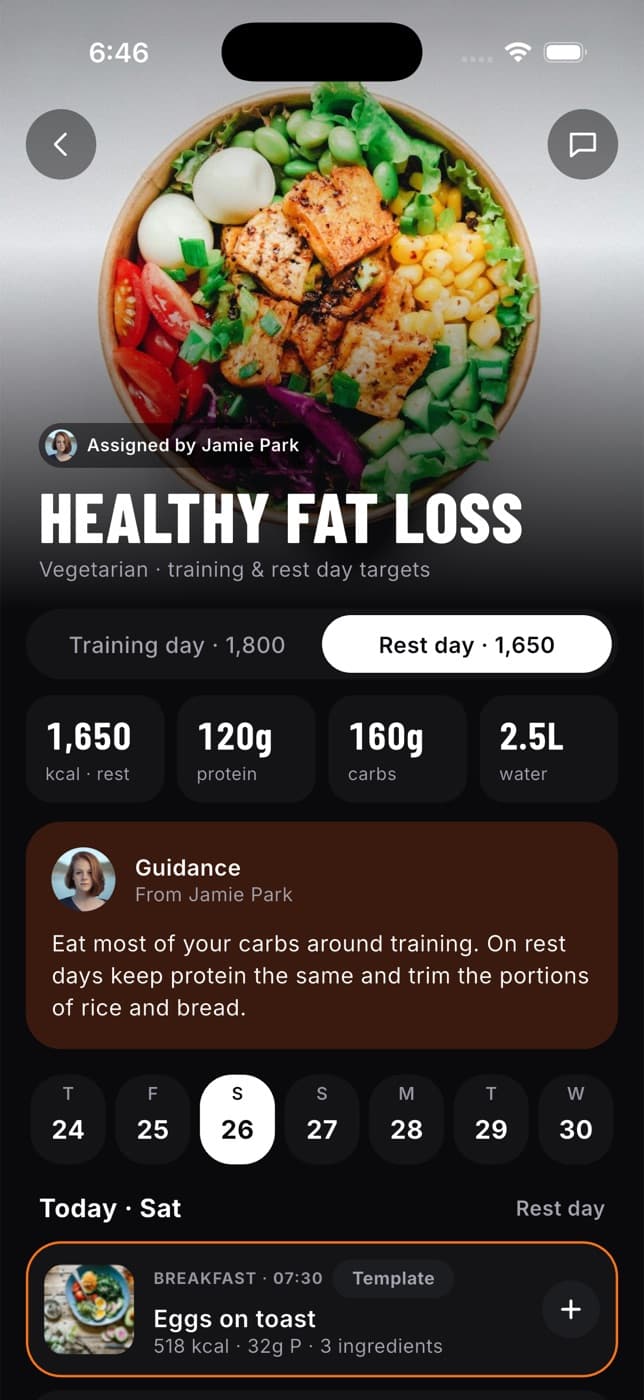
The overview shows:
- who wrote the plan, with a Message button for your nutritionist
- a Training day and Rest day switch, if your targets differ on those days
- your daily targets for calories, protein, carbs and water
- Guidance from your nutritionist, or Why this plan for a plan from Fit+ AI
- a week strip, so you can see the meals planned for any day
You can also reach the overview from Meal plan in My plan on the Train tab.
Common questions
Your plan either sets its own training days, or follows the training days of your program on Train. On training days you get more to eat to fuel your workout.
Yes, some plans don't set one. Fuel then shows how much you've eaten, with "no target set". Fit+ never makes up a target.
Only if you share your nutrition with them. If you stop sharing, the plan you have keeps working, but your nutritionist can't see your food log or update your plan. Manage this from Me, then Data sharing.
Yes. Open it from the plan list and tap Start this plan again.