

Learn articles and workshops
Read Fit+ articles, save them for later and reserve a spot in your gym's workshops and classes in the Fit+ app.
Learn is your library of short articles on training, recovery and nutrition. It also lists upcoming workshops, classes and club runs at your gym, so you can reserve a spot.
Read an article
Tap Community, then Learn.
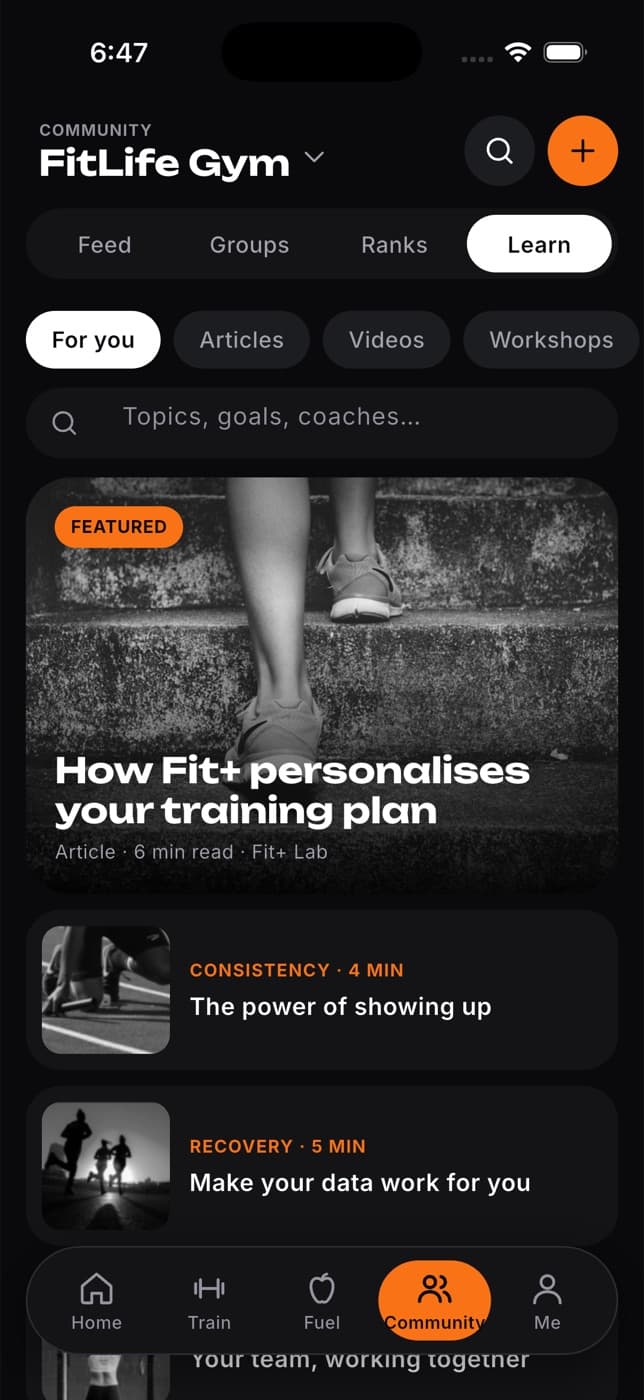
Use the chips to narrow the list (For you, Articles, Videos, Workshops, Saved) or search by topic in the search field.
Tap an article to read it.
To keep it for later, tap the bookmark at the top. Find it again under Saved.
At the end of an article, tap Ask AI Coach about this article to open the AI Coach and ask your question. See Ask the AI Coach.
Reserve a spot in a workshop or class
Workshops, classes and runs from your gym appear under Workshops. You need to be a member of a gym to see them.
Tap Community, then Learn, and scroll to Workshops. Choose the gym at the top of Community to see its events.
Tap an event to see the date, time, place, host and description.
Tap Reserve spot (or Book class for a class).
What happens next: the button changes to You're booked. To give up your place, tap Cancel my spot.
If a class is full
If a class is full, Fit+ offers Join the waitlist. You'll see your place in the queue. When someone cancels, the first person waiting gets the spot and a notification.
Workshops and runs don't have a waitlist. If one is full, try another date.
Common questions
Saved articles are kept on the phone where you saved them. Save them again on your new phone.
Workshops come from your gym. If you haven't joined a gym, or your gym hasn't scheduled any, the list is empty. See Join groups and clubs.
The event shows Cancelled with the gym's reason. You don't need to do anything.