

What your clients share with you
What you can see about a client, how to ask them to share more and what happens when they stop sharing.
Being a coach or nutritionist on Fit+ doesn't give you access to anyone's data. Each client chooses what to share with you in the Fit+ app, and you only see that. This page explains what each kind of sharing unlocks and how to ask for more.
What each kind of sharing unlocks
| When the client shares | You can |
|---|---|
| Workouts | See their program, training history and progress charts, read the weekly reports they send you, assign or change a program, answer exercise swaps, write training notes, use their recent loads in a workout |
| Nutrition | See their nutrition plan, food diary and nutrients, review their weekly check-ins, assign or change a plan, answer meal swaps, write nutrition notes |
| Sleep and Recovery | See readiness, resting heart rate and sleep on their Health tab, and sleep in the weekly reports they send you |
| Measurements | See their weight on the Health tab and in the weekly reports they send you. Nutritionists also see the weight trend and their height and weight in the food diary. |
Coaches work with workouts, sleep, recovery and schedule. Nutritionists work with nutrition, measurements and schedule. A member is your client as soon as they share at least one of these with you.
You don't need any sharing to message a client or answer their session requests.
The same goes for an account you create with Add client: it starts with nothing shared, and the person chooses what to share with you. See Add a client.
How you can tell what a client shares
- The badges under a client's name, such as Shares workouts or Shares nutrition.
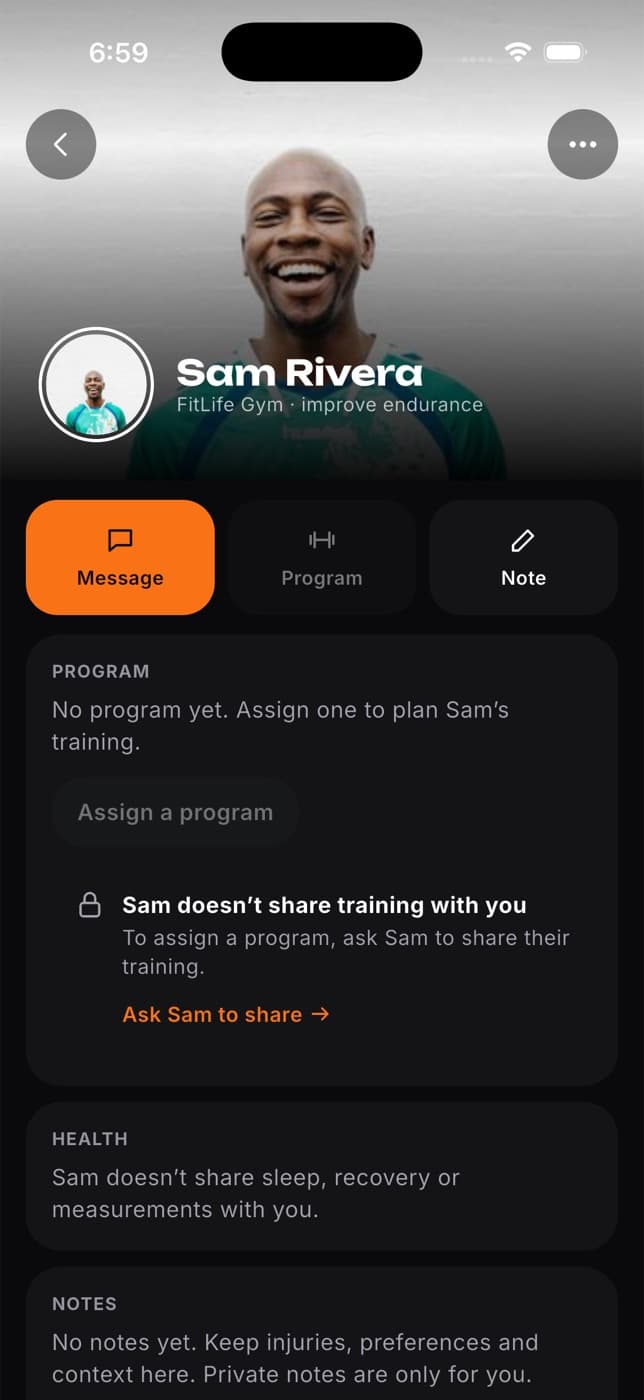
- Buttons for things they don't share are greyed out with a lock. Hover over one to see why.
- Tabs for things they don't share say so instead of showing data.
- When you pick a client for a program, plan or template, clients who don't share what's needed are greyed out.
Ask a client to share more
Open the client's profile and select the greyed-out button or the tab you need, for example Assign program.
A message explains what the client doesn't share with you. Select Ask [name] to share.
You see Request sent to [name]. The client gets the request in Data sharing in their Fit+ app.
You can also ask from the template assign window, where clients who don't share show an Ask [name] to share button.
Nothing is shared until the client allows it, and they decide for how long. They can stop sharing at any time. If you already asked for the same thing in the last 7 days, Fit+ doesn't send the request again and tells you that you already asked.
When a client stops sharing
A client can stop sharing, or their sharing can run out. From that moment:
- They leave your client list if they no longer share anything you use.
- The programs and plans you wrote for them disappear from your lists. They stay in the client's own history.
- Their open swap requests disappear from Requests and Messages.
- A draft program you saved for them shows that the client no longer shares workouts.
Your chat with them stays, and so do their session bookings.
Weekly reports
Sharing workouts doesn't send you a client's weekly report. The client chooses to share each report from the Fit+ app, and can add a note for you. A report only includes their protein and sleep when they already share nutrition or sleep with you. See Follow a client's progress.
What always stays private
- Anything the client didn't share with you. Health data stays private unless the client shares it.
- Progress photos. They are only for the client, even when they share everything else with you.
- Body measurements other than weight, such as waist or arm size.
- Their conversations with anyone else.
- Your clients' data is never sent to an AI service from Fit+ Pro. When you use AI draft, only the description you type is used.
No. Booking a session doesn't share any data. Ask them to share what you need.
Notes are visible to the client and to the other professionals the client shares that area with. For example, a training note is visible to any coach the client shares workouts with.
They haven't allowed it yet. The button shows that you already asked. Remind them in chat to check Data sharing in the Fit+ app.