

Earn badges and track records
See the badges you've earned, what's next, your personal records and your progress charts in the Fit+ app, share a record on your profile and hide a badge from it.
Fit+ celebrates your progress with badges and keeps track of your personal records. Everything here comes from the workouts you complete, so every session moves you closer to the next badge.
See your badges
Tap Me, then Achievements. The row shows how many badges you have. You can also tap the Progress card at the top of Me, then Achievements.
On Badges, the top shows how many achievements you've earned out of the whole collection, with your newest badge beside it. Tap View your achievement to open it. Below it, Your next achievement shows the badge you're closest to.
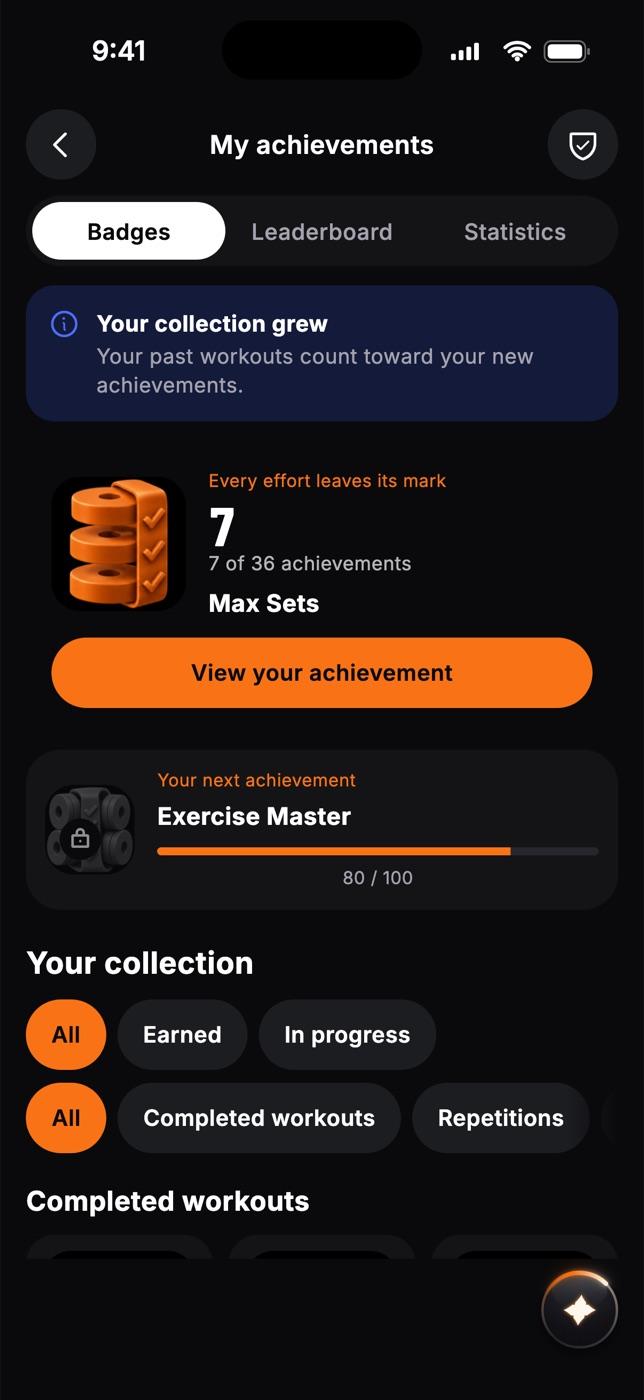
Under Your collection, badges sit three across, each with its progress and Earned or In progress. Choose All, Earned or In progress, or a kind of badge such as Completed workouts, to narrow the list.
Tap a locked badge to see what it takes to earn it. Tap an unlocked badge to open it: tap Draw it again to replay its celebration, or choose whether it shows on your profile.
Badges you can earn
| Badge | How to earn it |
|---|---|
| First Steps | Complete your first workout |
| Full Strength | Complete 8 workouts |
| Consistency Champion | Complete 25 workouts |
| Fifty Strong | Complete 50 workouts |
| Fitness God | Complete 100 workouts |
| Max Reps | Log 100 reps |
| King of Reps | Log 1,000 reps |
| Max Reps Pro | Log 2,000 reps |
| Max Sets | Log 80 sets |
| Exercise Master | Log 100 sets |
| Star Muscle | Log 250 sets |
| 5 Day Streak | Train 5 days in a row |
| Always No 1 | Train 7 days in a row |
| 10 Day Streak | Train 10 days in a row |
| 50 Streak | Train 50 days in a row |
| 35 Days | Work out on 35 different days |
| Best Speed | Complete 10 runs |
| 5,000 Calorie Burn | Burn 5,000 calories in workouts that record calories, such as watch workouts |
Streak badges count your longest run of training days, so you keep them even if your current streak ends.
Celebrate a new badge
When a workout unlocks a badge, a celebration screen opens after your workout summary.
- Tap Share to Community to post about it. The post is filled in for you.
- Tap Keep going to close it.
If a workout unlocks more than one badge, you'll see one celebration. The others appear as unlocked on your Achievements screen.
Check your records
Tap Me, then Achievements, then Statistics. You can also tap the Progress card at the top of Me, then Personal records. You'll see:
- Your totals for Completed workouts, Repetitions, Sets, Consecutive days, Different activity days, Running sessions and Recorded calories.
- Strength score: the total of your best estimated one-rep max on your top three lifts, and how much it grew this month.
- A monthly trend of your strength score.
- Progress: open Progress charts (your volume, workouts per week and main lifts), Muscle volume (sets per muscle against the range that builds muscle) or Weekly report (last week summed up). See Track your progress.
- Personal records: your best set for each exercise. Tap one to see your six best sets with dates.
- Your longest streak of training days in a row.
Weights show in your units. Warm-up sets never count toward your records, your strength score or the total weight you've lifted.
Your Me tab also shows your total workouts, your current day streak and the total weight you've lifted.
Share a record on your profile
Your records stay private until you share them, one by one.
Tap Me, then Achievements, then Statistics, and tap a personal record.
Tap Share on my profile.
Under Who sees it, choose Only me, Followers or Anyone who can open your profile. The last one follows your Profile visible to setting.
Tap Share record.
The record shows in the Achievements tab of your profile, with the exercise, the date and your best set in your units. You can also start from your own profile: on the Achievements tab, tap Share a record, then pick a record.
To change who sees it, open the record again, choose and tap Save. To keep it to yourself again, tap Stop sharing. Your coach sees your records when you share workouts with them, whatever you pick here.
If a record is no longer your best, it can't be shared. Share your new record instead.
Hide a badge from your profile
People who can open your profile see the badges you earned in its Achievements tab. To keep one to yourself:
Tap Me, then Achievements, and tap the badge.
Turn off Show on my profile.
The badge stays yours and still counts in your collection. Only your profile stops showing it. Who sees your achievements shows your Profile visible to setting. To hide every badge at once, turn off Achievements in What others see.
Common questions
Badges only count completed workouts. Check the Your next achievement card to see how close you are. Reps count for rep-based exercises only, not timed ones.
People who can open your profile see the badges you earned in its Achievements tab. You can hide one badge with Show on my profile, or all of them in What others see. Your health data, weight, measurements, photos and meals never show.
Log a set with weight to start your score. The monthly trend appears after your second month of training.