

Your food diary
Log meals and water, edit or copy what you logged, see your targets and nutrients, and get AI ideas for swapping a meal.
The Nutrition page is your food diary. Log what you eat and drink, see your calories and protein at a glance, and follow the plan your nutritionist set or the goal you chose.
Select Nutrition in the sidebar to open it.
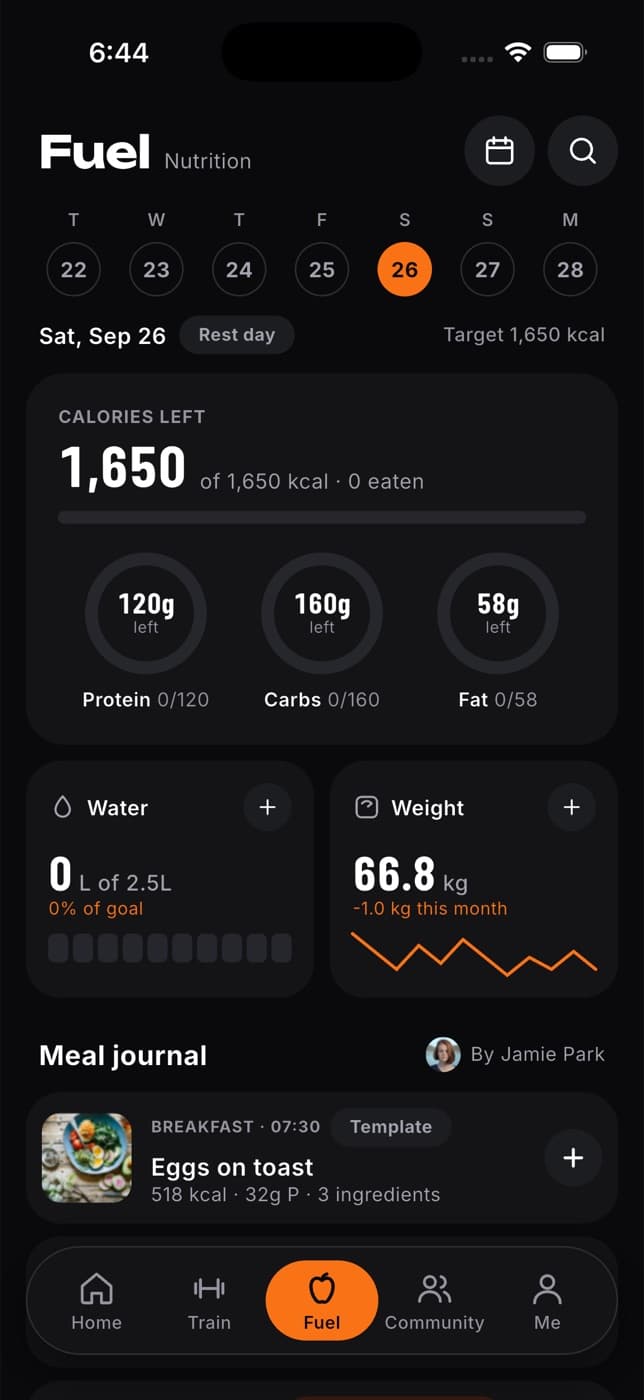
What you'll see
- Calories and protein: what you've eaten and what's left, with carbs and fat below. If you have no targets yet, you'll see your totals without them.
- Water: how much you've had, in your units, and the last seven days.
- Goal & check-in: your nutrition goal and your weekly check-in. See Your nutrition goal and weekly check-in.
- Weight: your latest weigh-in and trend. Select Trend for the full chart. See Track your weight.
- Your plan: your nutritionist's targets and tips, if you have one. Targets can be different on training days and rest days.
- Meals: Breakfast, Lunch, Dinner and Snack, each with what you logged.
- Log again: meals from the last four weeks, ready to add again with one click.
- AI meal replacements: ideas for swapping a meal.
- Recipes shared with you: recipes your nutritionist sent you, if any.
The buttons at the top open My foods, your food library, and Recipes, your recipes.
Log a meal
The quickest way is from your food library: select My foods, search your own foods or the Fit+ food database, and log in one click. To type the numbers yourself:
Select Log a meal
It's at the top of the page. Or select + on a meal, such as Lunch, to add straight to it.
Choose the meal
Breakfast, Lunch, Dinner or Snack. Fit+ picks one for the time of day, and you can change it.
Describe the food
Type what you ate in Food or meal.
Add the numbers
Enter the Calories (kcal), Protein (g), Carbs (g) and Fat (g). Check the packet or your plan if you're not sure.
Select Add to
The button names the meal, for example Add to lunch. You'll see "Meal logged" and your totals update.
Log it again
Had the same breakfast as yesterday? In Log again, select the meal to add it to the day you're looking at. You can also open a food's options menu and choose Log again.
Change or remove an entry
Open the food's options menu (the ... button next to it):
- Edit: change the name, the Amount (0.5×, 1×, 1.5× or 2×, which scales every figure), the calories and macros, fibre, sugar and sodium, the meal, the date or the time. Select Save changes.
- Copy meal: copy it to other days. See below.
- Log again: add it once more to the same meal.
- Remove from diary: take it out. Select Undo straight away to put it back.
Copy a meal or a whole day
Choose what to copy
Open a food's options menu and choose Copy meal, or select Copy day above your meals.
Choose the days
Under What to copy, pick This meal or Whole day. Under Copy to, pick one or more days. Days still to come open once they arrive.
Choose the meal to copy into
Under Into, keep Same meal or pick another one.
Select Copy to
The button shows how many days, for example Copy to 2 days. Water stays on the day you drank it.
Keep favourites and save meals
- Select the star next to a food to add it to your favourites. It appears under Favourites in your food library.
- Select the save button on a meal, such as Breakfast, to Save as a meal. Give it a Meal name and select Save meal. Next time, log the whole meal in one click from your food library.
Log water
Select + on Water
Log water opens.
Choose how much
Pick 150, 250, 330, 500 or 750 ml, or use minus and plus to adjust.
Select Log
The button shows the amount, for example Log 250 ml.
To remove a glass, select the bin next to the entry.
Fill in a past day
Forgot to log yesterday? Select the day in the strip at the top. Use the arrows to go back a week at a time, up to four weeks. Anything you log is saved to that day.
See fibre, sugar and sodium
Select Fibre, sugar and sodium under your weight to open Nutrients. You'll see your macros against your targets, plus fibre, sugar, sodium and saturated fat compared with general guidance for adults. These figures only come from foods that carry them, such as foods from the Fit+ food database or a scanned label, so the page tells you how many of your entries had them.
Get ideas to swap a meal
Want an alternative to a meal in your plan? The AI coach can suggest a few.
Turn on AI features
Under AI meal replacements, tick the box to allow optional AI processing. It's off until you turn it on. You can turn it off again at any time.
Describe what you want
Say which meal you want to replace and what you'd like instead. Add any allergies or foods you avoid, or type "None".
Select Find meal replacements
You'll get up to three ideas, each with a portion, estimated calories and macros, ingredients and why it fits.
Log one if you like
Select Review for my diary, correct anything that looks off, then select Log this meal. It's added to your diary under Snack.
Always check portions, labels and allergens yourself. Suggestions don't change the plan your nutritionist gave you.
Who can see your diary
Only you, until you share Nutrition with a nutritionist or coach on Data sharing. Once you do, they can see your diary and water and set your plan and targets.
Common questions
If a nutritionist set your plan, their targets apply. Message them to ask for a change. Don't have one? Set your own nutrition goal and Fit+ works out your targets, or select Find a nutritionist to work with one.
Not on the website. You can do both in the Fit+ app. On the website you can search the Fit+ food database from your food library.
No. You can log for today or any day in the last four weeks.
It was changed somewhere else, for example in the app. Refresh the page and try again.
Look up an exercise
Search the Fit+ exercise library for technique videos, step-by-step instructions, tips and safety notes, and complete an exercise review you were asked to do.
Log food from your library
Search the Fit+ food database, keep favourites, save meals you eat often and add foods of your own, then log any of them in one click.