

Fit+ team guide
How the Fit+ team runs the platform from the admin website, and how finance viewers read financial records.
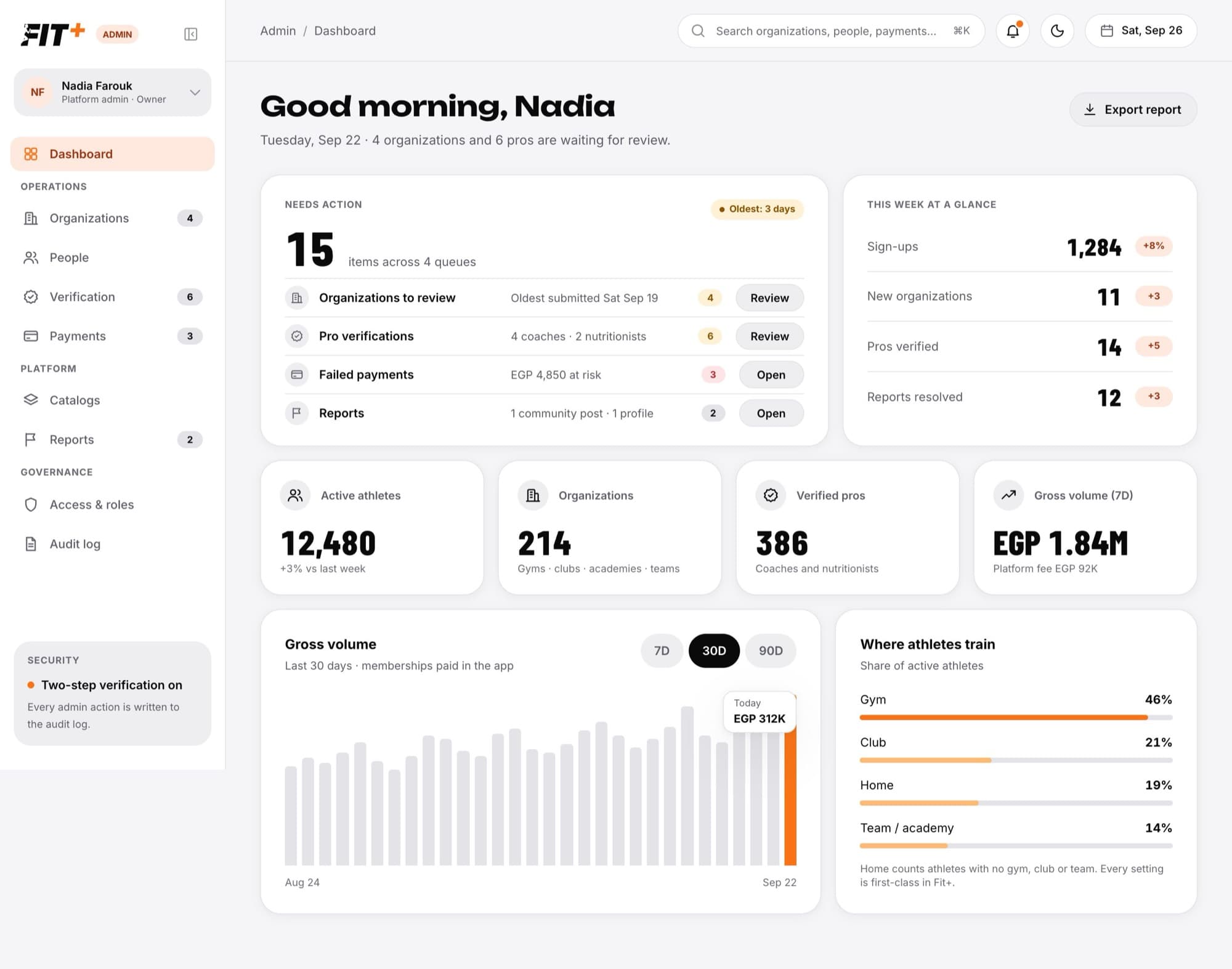
This part of the guide is for the Fit+ team. It shows you how to sign in to the admin website, review new gyms and professionals, look after people's accounts, follow up payments, and keep the exercise catalog, reports and support requests in good shape. There's also a short guide for finance viewers, who get temporary read-only access to financial records.
What you can do
- Review new partners. Approve gyms, clubs, academies and teams before they go live, or ask them for changes.
- Verify professionals. Check a coach's or nutritionist's identity and qualifications before they can take clients, or add a professional account yourself.
- Help people. Find anyone on Fit+, see their account details, reset their sign-in, suspend an account or delete one when the member asks.
- Follow up payments. See membership payments, chase failed ones, check payouts and set the Fit+ fee.
- Keep content safe. Add exercises to the shared catalog, handle reported posts and profiles, and reply to support requests.
- Manage the team. Invite admins, choose their role and give temporary extra access when someone needs it.
Health data stays private
No one on the Fit+ team can see a member's health data, whatever their role. You can see which coaches and nutritionists a member shares with, but never the data itself.
Find your way around
The sidebar on the left groups everything you need:
- Dashboard: what needs your attention today.
- Operations: Organizations, People, Verification and Payments.
- Platform: Catalogs, Reports and Support.
- Governance: Access & roles and Audit log.
A small number next to a sidebar item tells you how many things are waiting there. The top bar has the platform search, the notifications bell and a light or dark theme switch. If you also own a gym or coach on Fit+, switch between your workspaces from the account menu at the top of the sidebar.
What you see depends on your admin role. If a button described in this guide isn't there for you, your role can't do that action. See Admin roles and team.
Start here
Sign in with two-step verification
Sign in, set up your authenticator app and enter your code.
Accept an admin invitation
Join the Fit+ team from your invitation email.
Use the dashboard
See what's waiting, this week's numbers and your notifications.
Review and approve organizations
Approve, reject or ask a gym, club or team for changes.
Suspend or restore an organization
Pause a live organization and bring it back.
Find a person and manage their account
Look someone up, add a professional, reset their sign-in, suspend or restore them.
Verify coaches and nutritionists
Check applications, ask for more information, approve or decline.
Check payments
Transactions, failed payments, payouts, the Fit+ fee and subscriptions.
Add and edit exercises
Keep the shared exercise catalog up to date.
Handle reported content
Dismiss, warn, suspend or remove what people reported.
Reply to support requests
Answer questions and feedback, and finish account closure requests.
Search the platform
Find organizations, people, applications and exercises.
Admin roles and team
What each role can do, inviting admins and changing roles.
Give temporary access
Add one extra permission for a limited time, including finance access.
Check the audit log
See who did what, when and why.
View financial records
For finance viewers with temporary read-only access.